A homelab usually starts with one Raspberry Pi and a single SSH command. A few years later you have a folder of terminal profiles, a remote desktop app for the Windows machine, Screen Sharing for the Mac mini and a list of IP addresses in your notes. Royal TSX from Royal Apps in Vienna is meant to replace all of that. It is a connection manager for macOS that opens SSH, RDP, VNC, web and file transfer sessions as tabs in one window, and it keeps every host, password and setting in a document you control.
Quick verdict
Royal TSX is the most complete single-window connection manager for a mixed Linux, Windows and Mac homelab on the Mac.
- Best for
- One person running a small homelab who wants SSH, RDP, screen sharing, web admin pages and file transfer in one organised document.
- Main benefit
- Credential objects and folder inheritance mean one password change updates every connection that uses it.
- Biggest drawback
- The interface feels dated and the document and object model takes setup before it pays off.
Royal TSX Individual User licence
royalapps.com · Worldwide
Check price and availability: Royal TSX Individual User licence at royalapps.comProduct link.
Time with the product: A first look after the licence arrived on 11 November 2026.
Reviewed version: Individual User licence (version 6.4.5, 26.0 in public beta)
Compatibility: macOS; documents also open in Royal TS for Windows and the Royal Apps iOS and Android apps, and the 26.0 beta requires macOS 14 Sonoma or later.
Review context: The review focuses on whether one app can handle SSH, RDP and VNC for a one-person homelab.
My homelab is a good test for it. From a 14-inch MacBook Pro, I SSH into a Raspberry Pi 5, an Orange Pi and a NAS, I use RDP to reach a Windows desktop, and I use screen sharing to reach a Mac mini. Royal TSX is built for IT teams with hundreds of servers, so my question is simpler: does it make sense for one person with five machines? From the documentation, I think it does, and the free mode may even be enough.
Disclosure: Royal Apps sent this Royal TSX licence free of charge for review and I keep it. No money changed hands, and Royal Apps had no approval over the text.
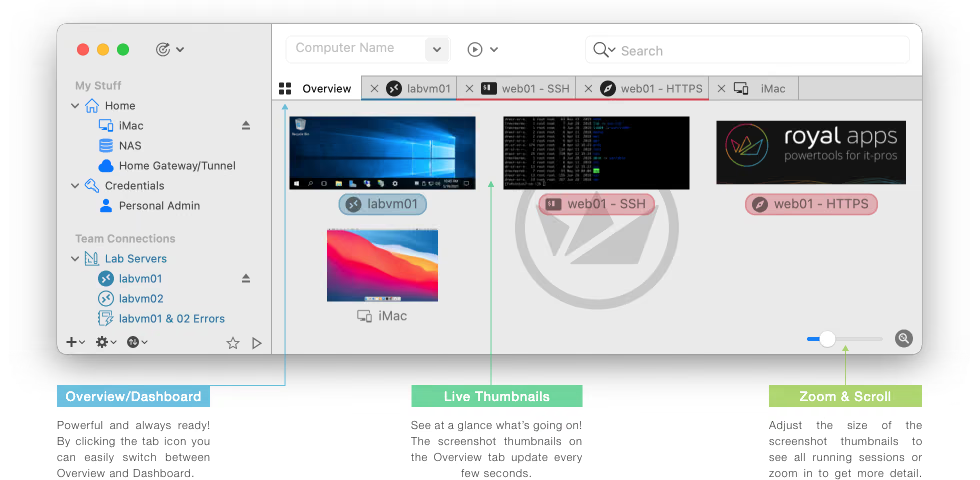 Screenshots: Royal Apps.
Related reading
One window for a small homelab
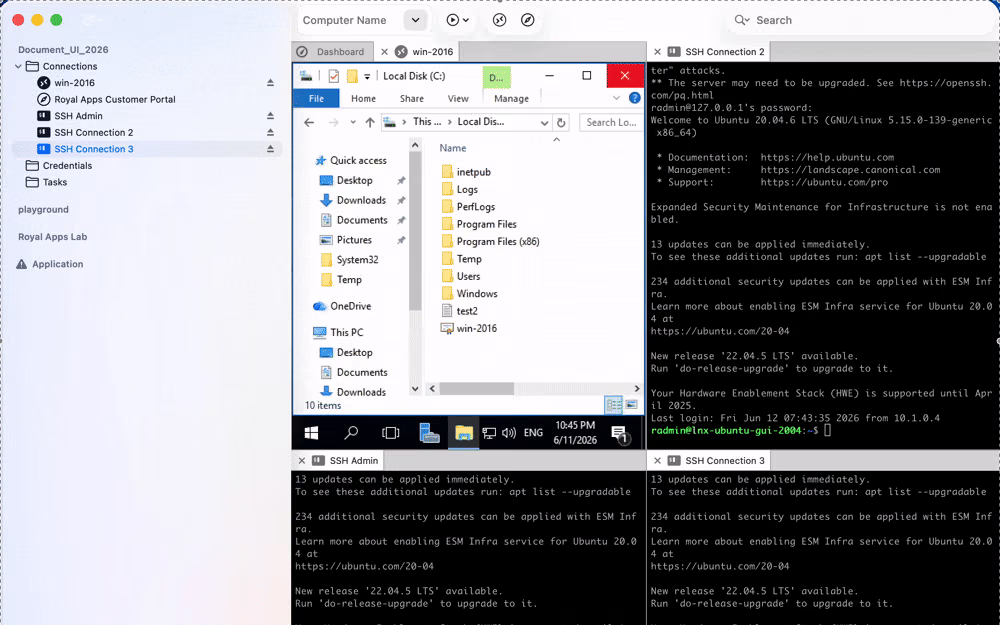
The main appeal is the Overview tab. Every open connection appears as a live thumbnail, so an RDP session to Windows, an SSH terminal on the Pi and a VNC view of a Mac sit side by side, and you switch between them like browser tabs. Tabs can be split or pulled out into separate windows, and the 26.0 beta adds grid layouts that mix vertical and horizontal splits, as Royal Apps describes in its V26 interface post.
Documents: your homelab as a file
Royal TSX organises everything into documents. A document holds connections, folders, credentials and tasks, and it is saved as an .rtsz file. On Royal Apps’ community forum, its developer explains that documents are XML, that passwords and protected fields are always encrypted with AES-256 even without a document password, and that the whole file can be encrypted too. You should do that.
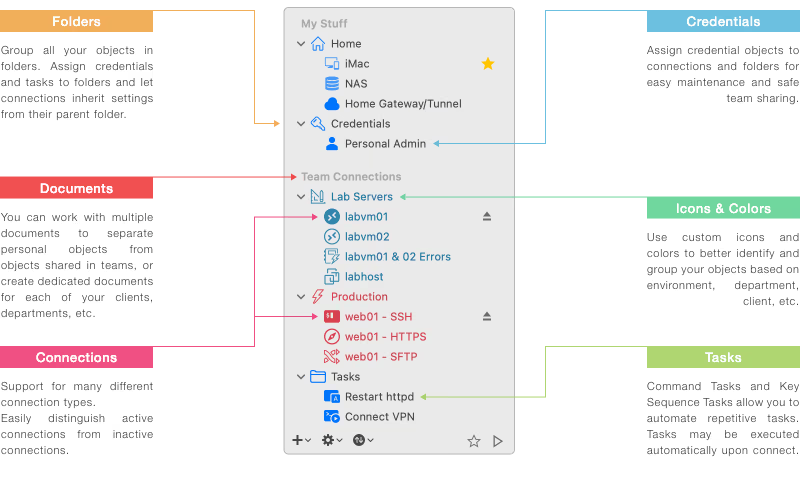
I like this model because the file is the source of truth. Keep a “Homelab” document in iCloud Drive or Dropbox and it syncs and backs up like any file. Royal Apps says the same document opens in Royal TS on Windows and in its iOS and Android apps. Folders pass settings down to the connections inside them, which suits a lab where every Linux box uses the same user name.
Credentials are objects, not fields
This is the feature I find most useful for one person. Instead of typing a password into each connection, you create a credential object once and point connections at it. Change the password on the credential and every connection that uses it follows. A connection can also inherit its credential from its folder, so a “Linux boxes” folder with one SSH credential covers the Pi 5, the Orange Pi and the NAS at once.
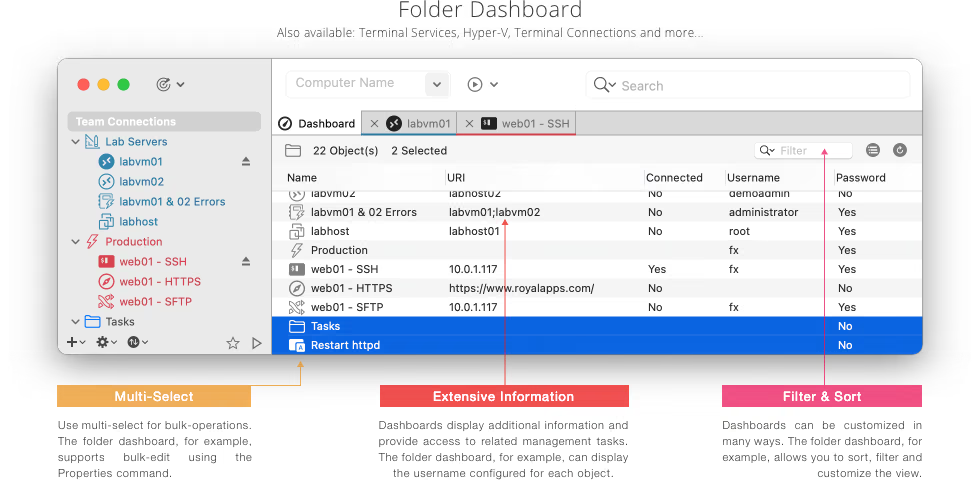
Connections can also refer to a credential by name, so a shared document holds no personal passwords, and Royal TSX can pull credentials from 1Password, LastPass and KeePass. The 1Password link would keep the document free of secrets.
The plugins: one app, several engines
Royal TSX is plugin based, and each connection type is an engine you install from inside the app. The Terminal plugin is based on iTerm2 and handles SSH and Telnet. Remote Desktop is based on FreeRDP. Royal TS on Windows also has a plugin built on Microsoft’s own client, but the Mac feature page names only FreeRDP. The VNC plugin speaks Apple Remote Desktop, which the Mac mini needs. A Web plugin uses WebKit for admin pages such as a NAS dashboard, and File Transfer covers FTP, SFTP and SCP.
Related reading
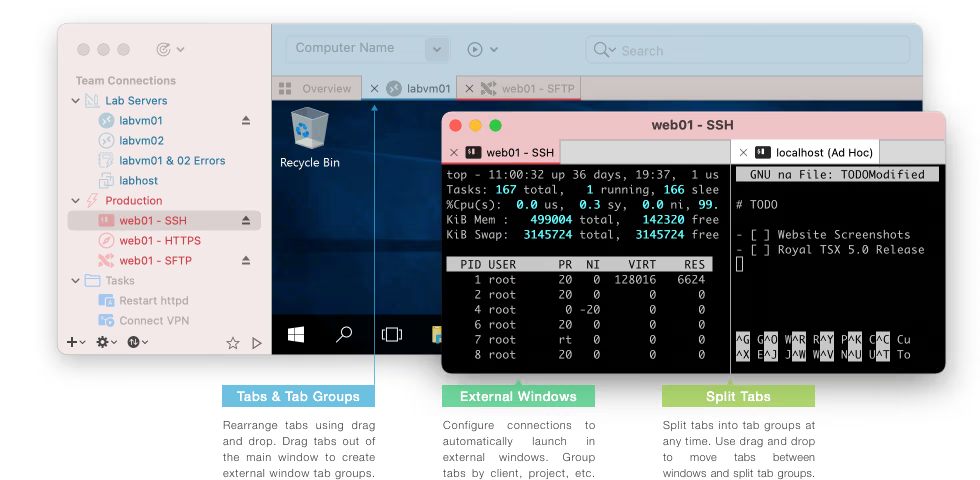
The 26.0 beta moves to FreeRDP 3.33.1, rewrites VNC as RoyalVNC with Apple’s adaptive encoding and drag-and-drop file transfer to a Mac, adds S3 storage to File Transfer, and adds a Proxmox plugin for virtual machines and containers.
My lab maps to seven objects: three SSH connections, one RDP, one Apple Remote Desktop, SFTP to the NAS and its web admin page.
Dynamic folders and the Secure Gateway
Dynamic folders run a script and turn its output into connections. Royal Apps’ scripting documentation lists Bash, Python, PowerShell and AppleScript on the Mac, plus an in-memory JavaScript option. The script prints a format called RoyalJSON and runs when you choose Reload. If your lab already has an inventory file or a Proxmox API, you could generate the list instead of maintaining it by hand.
The Secure Gateway is SSH tunnelling. You create a gateway object that points at an SSH server, assign it to RDP, VNC or terminal connections, and Royal TSX forwards the session through it. Royal Apps sells Royal Server for this, but its Secure Gateway post says any SSH server that allows port forwarding works. A Raspberry Pi reachable over a VPN could be the single door into the lab, with RDP and screen sharing tunnelled behind it.
What the free Lite mode allows
Royal TSX has a free mode with no time limit and no registration. Royal Apps’ licensing FAQ allows up to 10 connections, 10 credentials and one open document, and disables AppleScript. Everything else works. My seven connections fit, so a homelab my size could run on Royal TSX for free indefinitely. The limits bite once you add a work document or let a dynamic folder generate more than ten hosts.
The MakerStack review makes two fair criticisms: the interface feels dated next to modern terminal apps, and the object model takes setup before it pays off. This is a tool for people who like to organise.
Related reading

Price and where to buy
Royal TSX is sold on the Royal Apps buy page. On 13 November 2026 it lists the Individual User licence for Royal TSX at €49 excluding VAT, or €79 bundled with Royal TS for Windows. Licences are perpetual and include one year of updates, after which you keep the version you bought. Royal Apps’ licensing post says that from v26 a single Desktop licence will cover Windows and macOS for €59 or $79, and that 26.0 needs a new key, free with active maintenance. Royal TSX is not sold on Amazon.
What this review is based on
Royal Apps offered a not-for-resale licence on 11 November 2026, so this is a first look. Features, limits and prices come from Royal Apps’ own pages, forum, documentation and blog posts linked above, and the criticisms from MakerStack. I have not yet built my homelab document, tested RDP to Windows or screen sharing to the Mac mini, tried the Secure Gateway through the Pi, or connected 1Password. The stable version is 6.4.5, and 26.0 is in public beta and requires macOS 14 Sonoma or later.
Verdict
On paper, Royal TSX answers the homelab question well. One document replaces a folder of terminal profiles, separate RDP and screen-sharing apps and a list of IP addresses, and credential objects turn five password changes into one. For one person with fewer than ten machines, the free Lite mode looks sufficient, and €49 is a fair one-time price if you outgrow it.
The trade is the learning curve and an interface built for IT departments. If you only SSH into one Pi, a terminal profile is simpler. If your lab mixes Linux, Windows and Macs, Royal TSX is the most complete single-window option I have looked at on the Mac, and I will report back once it has run my lab for a few weeks.
What worked
- One document holds every connection, folder and credential and can be synced and backed up as a single encrypted file.
- Plugins cover SSH, FreeRDP-based RDP, VNC with Apple Remote Desktop, WebKit web pages and FTP, SFTP and SCP in one tabbed window.
What bothered me
- The interface and object model are built for IT teams and take time to set up.
- Lite mode allows only one open document and no AppleScript, and v26 will need a new licence key.
Who should not buy it
- Someone who only connects to a single Raspberry Pi over SSH and is happy with a terminal profile.
Alternatives I would consider
- Terminal profiles plus separate RDP and Screen Sharing apps. Simpler and free if you have only one or two machines and no need for shared credentials.
Evidence and sources
The article separates my judgement from specifications and claims credited to their sources. All images are official Royal Apps screenshots from its feature page and V26 blog post.
- Royal TSX features
- Royal TSX V26 interface improvements
- Royal Apps forum on .rtsz encryption
- Royal TSX 26.0 beta features
- Royal Apps dynamic folders documentation
- Royal Apps Secure Gateway post
- Royal Apps licensing FAQ
- MakerStack review
- Royal Apps buy page
- Royal Apps licensing and versioning
Features, compatibility and rated figures from the maker are manufacturer information. My opinions are identified in the review.
Conclusion
The free Lite mode covers up to 10 connections and 10 credentials, and the paid licence is a one-time perpetual purchase.
Royal TSX Individual User licence
royalapps.com · Worldwide
Check price and availability: Royal TSX Individual User licence at royalapps.comProduct link.
One email a week with practical Mac workflows, useful comparisons and honest tech recommendations.