I like Rider because I want .NET work to feel clear across machines and project types. I enjoyed the product. A solution can contain a web service, a library, tests, tools, and game code with very different needs; keeping that investigation in one environment is a practical attraction for me.
Quick verdict
I recommend Rider for .NET work where code, tests and debugging need one clear workspace.
- Best for
- Developers maintaining a .NET solution on a supported development system.
- Main benefit
- I like keeping a failing test, its source and the debugger close to one another.
- Biggest drawback
- Using the same IDE on several systems does not make every .NET workload portable.
Rider
JetBrains · Choose the local store or delivery region
Check price and availability: Rider at JetBrainsProduct link.
Reviewed version: Rider
Compatibility: Choose the exact personal, business or bundle licence for the intended work. Check the current host, project-toolchain and account requirements.
Review context: The review focuses on developers maintaining a .NET solution on a supported development system.
We paid for our JetBrains software. The images in this review are official JetBrains screenshots.
The Rider product page presents both .NET and game development and currently offers free noncommercial use. That is different from a commercial licence, and it is worth checking the right terms before making a purchase. The product’s appeal should come from the solution it helps manage, rather than the licence category alone.
A solution is a set of relationships
The editor is only one part of .NET work. Projects depend on other projects. Different targets can have different constraints. A method call may reach an interface implementation in another assembly. An error visible in a test can originate far from the test file.
An IDE earns its place by making those relationships easier to follow. I care more about reaching the right implementation than about saving a few keystrokes while declaring a class. Work on existing code repeatedly asks where behaviour comes from and what a change might affect.
Rider’s broad role is attractive for someone who wants that work to feel consistent across machines. The same product can be used on several operating systems. That does not make every workload portable. A project may still depend on platform specific frameworks, services, or tools.
Related reading

This distinction matters especially on a Mac. Being able to open a solution is different from being able to run every target it contains. The buying decision should follow the actual SDKs and application types required by the project. A cross platform IDE cannot remove a platform requirement built into the software.
Tests should be easy to find and explain
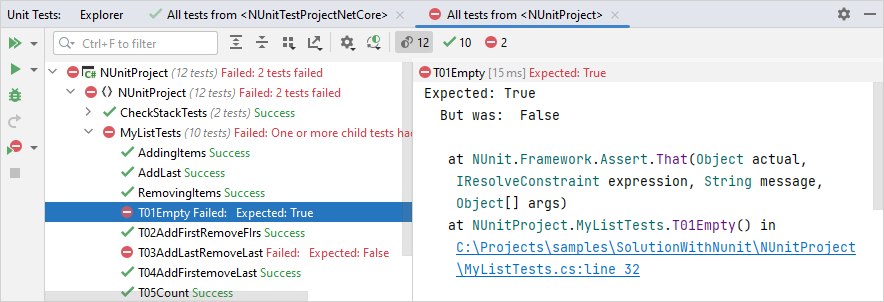
Rider’s unit testing documentation describes supported frameworks and ways to run, debug, cover, or profile tests. That is valuable because tests are part of the investigation, rather than a separate ritual performed only before a release.
A useful test view helps move between a failure and the code behind it. It should be possible to see which case failed, what it expected, and what happened instead. Running a whole solution again is not always the next useful step. Sometimes the right move is to isolate one failing condition and understand it.
There is a subtle trap in a polished test interface: a green result can look more complete than the underlying evidence. The test still needs to check the intended behaviour. A test that repeats the implementation or skips a difficult dependency may leave the important question unanswered.
The IDE can shorten the loop, but the developer must choose the question. For a changed validation rule, that might mean the accepted and rejected inputs. For a service call, it might mean cancellation and failure handling. Clear cases make the result valuable whoever wrote the code.
Sessions give a failure a working space
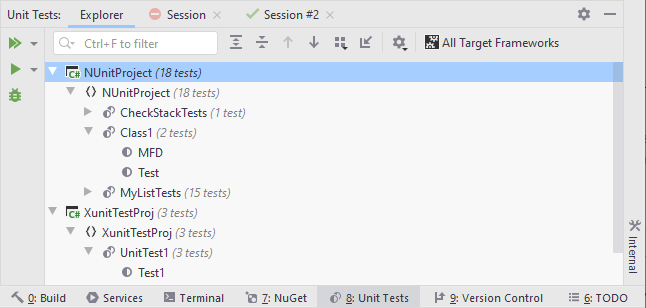
The Unit Tests window guide explains the test explorer and independent sessions. The attraction is keeping a related set of cases together while working through a change. A solution’s full test list is not always the most useful view for the current problem.
For example, an investigation may involve a small group of data conversion cases. Keeping that set visible helps compare failures and rerun only the relevant work. The wider suite still matters before integration, but it serves a different purpose from the narrow feedback loop used during development.
I also value a clear separation between a test failure and a test runner problem. An assertion failure says something about behaviour. A process that cannot start says something about the environment. Treating both as the same red icon can send a developer toward the wrong fix.
This is a reason to keep build and test commands understandable outside the IDE. A colleague or CI worker should be able to reproduce the relevant check. Rider can organise the evidence and provide navigation without becoming the only place the test process exists.
Coverage is a map, not a score to chase
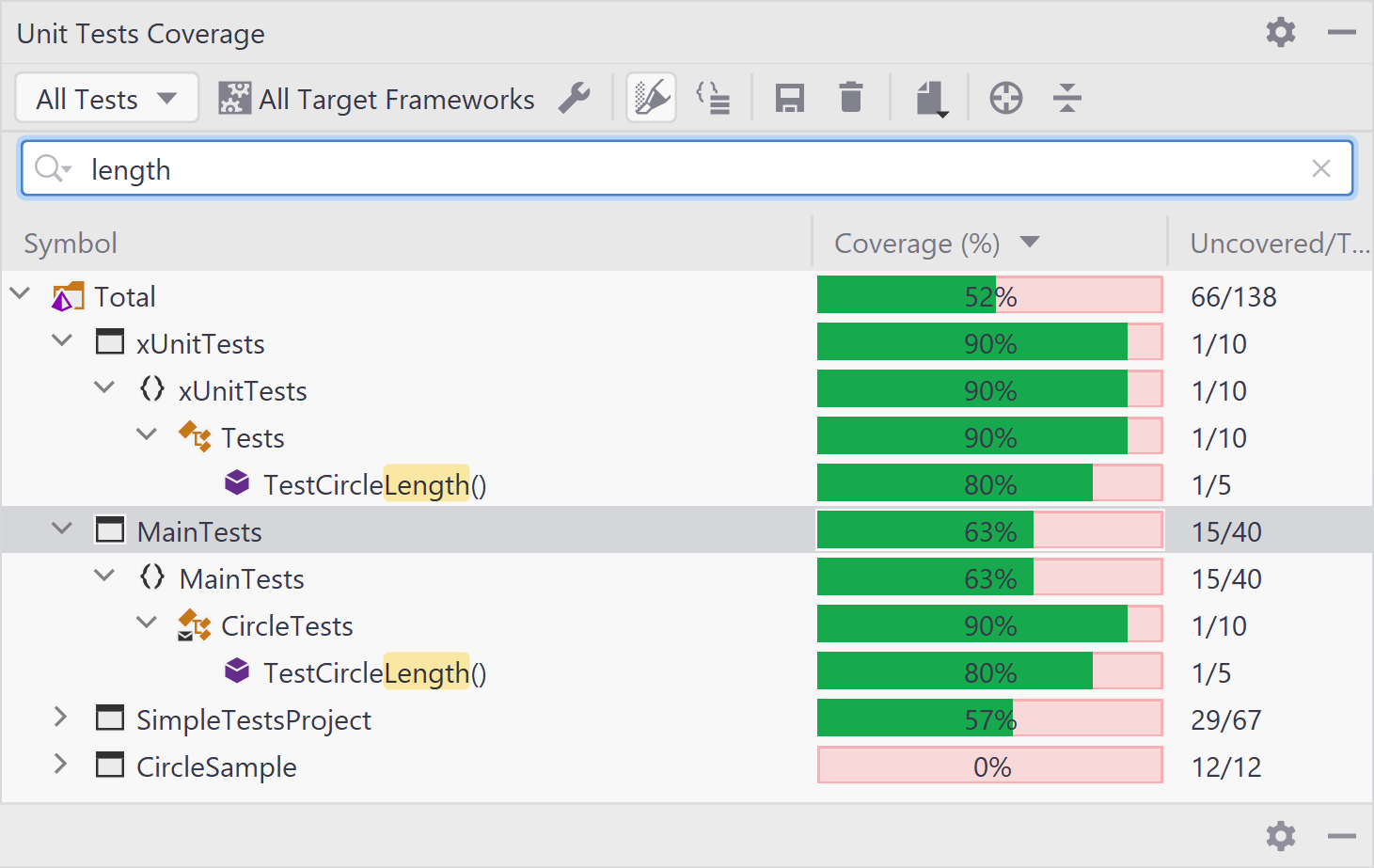
Rider’s coverage window documentation describes a tree view of coverage data and the dotCover connection. The useful part is seeing where execution reached the code. That can identify a branch the current tests never visit.
Coverage does not establish that a test has a meaningful assertion. A method can run while its output is barely checked. A high percentage can therefore hide a weak test design, while a lower percentage may still cover the most important user behaviour carefully.
Related reading

I would use the map to ask better questions. Is this branch part of the changed behaviour? Does it handle a real failure that deserves its own case? Is the uncovered code a simple adapter, or does it contain business decisions? Those questions give the visual information a practical purpose.
This also makes the tool useful during review. A reviewer can ask whether new decisions are exercised without making an arbitrary percentage the goal. The application needs evidence about its behaviour, not merely a greener chart.
Game work adds another layer
Rider’s product scope includes game development, which is a meaningful part of its appeal. A game project connects source code with engine behaviour, assets, editor state, and a running scene. Ordinary code navigation remains useful, but it cannot establish that a game feels right.
That distinction should shape the workflow. A clean build can catch some failures. Tests can protect selected rules. The actual application still needs to run in the intended environment. Movement, input, timing, and presentation are experienced properties that do not fit inside a compiler result.
For a developer moving between a backend service and game code, a familiar IDE can reduce tool switching. The value is consistency around editing and investigation. It should not become an excuse to treat engine specific requirements as if they were ordinary library code.
I would choose Rider for game work when its project understanding and debugging fit the actual engine and platform involved. The deciding evidence belongs to that project, rather than a generic claim that one IDE is best for every .NET task.
The agent still needs a reviewer
The current Rider page places agents beside the established development tools. That combination makes sense because generated .NET changes can cross several projects and tests. A strong environment can help make the resulting scope visible.
My standard would remain the same as for any patch. The change should have a clear purpose. The affected contracts should be understood. The checks should exercise the relevant behaviour. A confident explanation from an agent is useful context, but it is not a substitute for reading the code.
A direct refactoring can also be a better choice than an agent request. Renaming a symbol through a structured operation is easier to inspect than asking a model to perform broad text edits. Agents are most useful where the task needs investigation and several linked actions.
The extra cost should be considered separately too. An IDE plan and model access may involve different terms. Paying for both makes sense when the workflow closes useful tasks, rather than simply because the interface makes another service easy to start.
Why the consistency matters to me
I like having familiar tools around a changing set of projects. A service and a game are different products, but both require reading unfamiliar code, following a failure, and reviewing a change. A consistent environment can leave more attention available for the parts that actually differ.
Related reading
That is why I enjoyed Rider. The attraction is not the idea that all .NET work becomes identical. It is having a reliable place for the shared activities while respecting the target’s own requirements. A test result, a source reference, and a useful debugger view are valuable across several kinds of project.
I also want the environment to support ownership. When a patch is ready, I need to understand why it belongs in the solution. A clear test session and a focused difference help make that decision. They do not make the decision for me, and I prefer it that way. Rider’s practical appeal is that the tools for reaching a well supported decision sit close to the code I am responsible for maintaining.
Who should buy Rider
Rider is a strong candidate for a developer who wants a consistent .NET environment across operating systems, or who works in projects where navigation and test investigation are large parts of the day. Its attraction grows with the amount of existing code that needs to be understood before it can be changed.
It is less urgent for occasional edits in a small project with a reliable lighter setup. The IDE asks for attention, setup, and space on the machine. Those costs should buy a real improvement in the repeated work.
My verdict is that Rider’s best selling point is a connected workflow around a solution: source relationships, tests, debugging, and review in one place. Check the current Rider plans, confirm the platform needs of your actual targets, and judge the product by how clearly it helps explain the next change.
Where to buy
See Rider at the official product page. This is the product page for the model covered in this review. Check the model number, colour, included parts and delivery options before ordering. Prices and stock can change, so I use this page for the current offer. Matching the product to the review matters more to me than finding a similar name.
What worked
- I like keeping a failing test, its source and the debugger close to one another.
- The workspace supports understanding a patch rather than only producing one.
What bothered me
- Using the same IDE on several systems does not make every .NET workload portable.
- The target framework, services and platform-specific tools still set real limits.
Who should not buy it
- Someone assuming a cross-platform IDE removes Windows-only dependencies from a project.
Alternatives I would consider
- Your existing .NET tools. I would keep a working setup when it already makes tests and debugging clear. Rider earns the change when the shared workspace solves repeated friction.
Evidence and sources
The article separates my judgement from specifications and claims credited to their sources. Product images are identified by the credits in the article.
Features, compatibility and rated figures from the maker are manufacturer information. My opinions are identified in the review.
Conclusion
Worth it for regular solution maintenance when its tools reduce repeated navigation and setup work.
Rider
JetBrains · Choose the local store or delivery region
Check price and availability: Rider at JetBrainsProduct link.
One email a week with practical Mac workflows, useful comparisons and honest tech recommendations.