I like Raycast’s central idea: one familiar place for the small jobs around real work. Launching an app is only the beginning. Finding a copied detail, opening a project link and inserting a useful piece of text can matter just as much. My interest in Pro comes from that everyday connection between tools. The AI is part of the offer, but it is not the only reason I would consider paying.
Quick verdict
I would start with Raycast Free and pay only for a defined Pro feature.
- Best for
- A Mac user whose real workflow needs the paid plan rather than just the free launcher.
- Main benefit
- The launcher gathers familiar actions and supported integrations in one place.
- Biggest drawback
- The free plan already covers much of the everyday job; paid AI has limits and Cloud Sync does not sync clipboard history.
Raycast Pro for Mac; compare its current paid plan with Raycast Free
Raycast · Choose the local store or delivery region
Check price and availability: Raycast Pro for Mac; compare its current paid plan with Raycast Free at RaycastProduct link.
Reviewed version: Raycast Pro for Mac
Compatibility: This article compares Free and Pro for Mac. Raycast also has a Windows product; check its separate features and current requirements.
Review context: Official product pages and manuals checked on 8 November 2026. The assessment compares Free and Pro for Mac, including AI credits and the boundary between local history and Cloud Sync.
This is a product assessment based on Raycast’s official product pages and manual, checked on 8 November 2026, together with my judgement about the workflow. It is not an eighteen-month test or a measured productivity study. The images are official Raycast product illustrations, rather than captures of my own setup. The links here are ordinary product and documentation links.
Why the ordinary tools interest me
A separate utility can be excellent and still create another place to look. A launcher has a chance to reduce that search: the same entry point can lead to an app, a command or a saved item. That is the part of Raycast I find most attractive. I want the tool to help me return to the task, rather than become another task to manage.
This does not make a collection of features valuable by itself. A command only earns its place when it solves something I need to do. A long extension list is less useful than a short set of commands I understand. My buying decision would start with those repeated jobs and only then move to the paid features.
The Raycast quickstart explains the main search interface, commands and ways to reach them. I would start there, using the free application, before trying to reproduce a complicated setup from someone else’s screenshot. A setup should fit the work it supports.
Clipboard History: a useful local reference
Raycast’s Clipboard History documentation describes searchable copied text, images, files, links and colours. Retention depends on the selected setting and plan. Pro offers longer history, including an unlimited-retention option; that setting needs to be chosen rather than assumed.
The appeal to me is straightforward. When several useful details have been copied, I want to find the right one by its contents instead of repeating the search that produced it. That can support writing, comparing code or collecting reference material. It does not require an AI answer.
Related reading

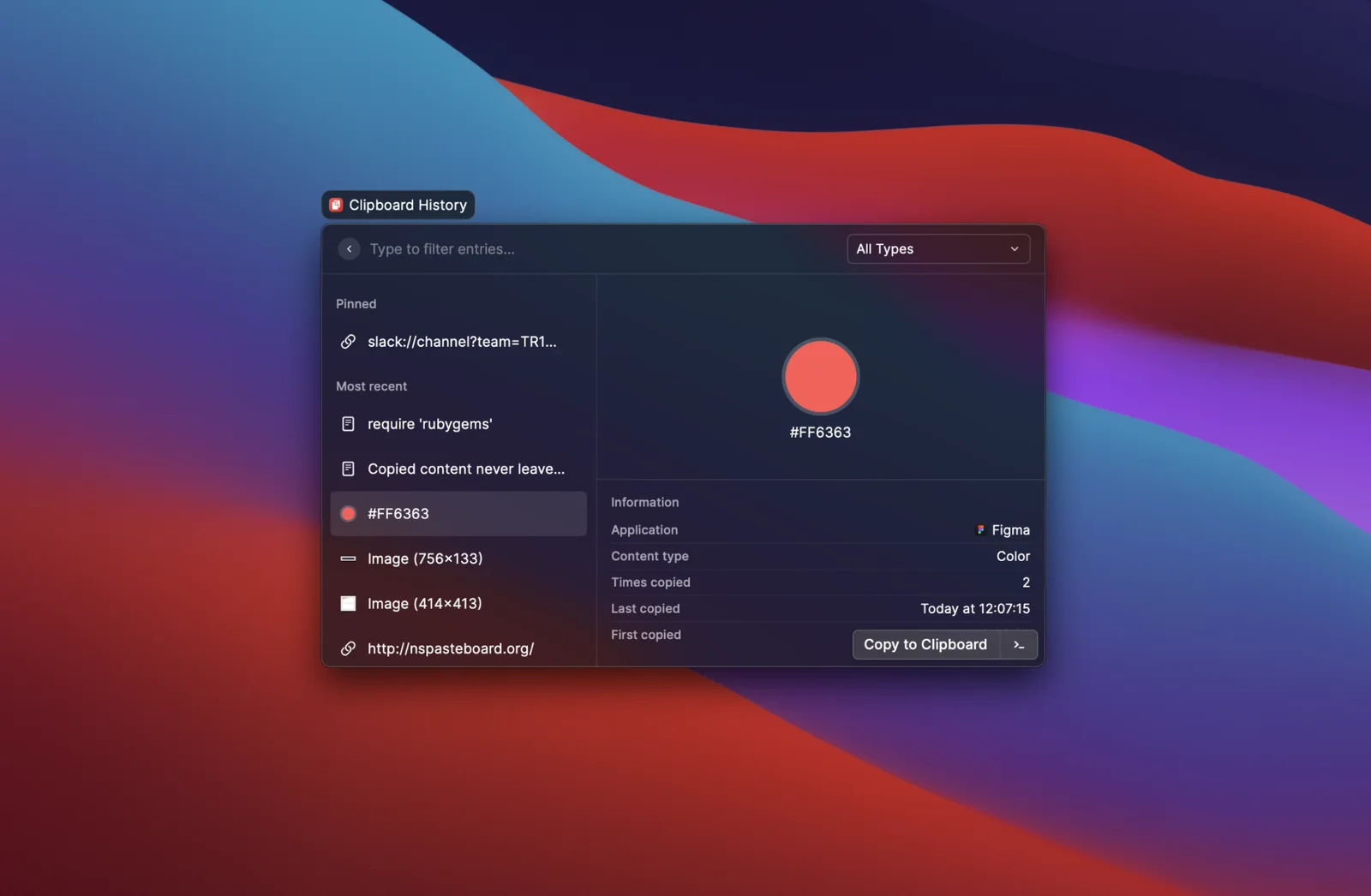
Official product illustration: Raycast. It shows the interface, not my personal clipboard.
I would also review what is being kept. A longer history is convenient, but it is still a collection of copied material. Keeping everything forever is not automatically the best choice. For my buying decision, control over that history matters alongside its length.
Snippets: start with text you actually repeat
Raycast’s Snippets manual explains saved text, search, optional expansion keywords and dynamic placeholders. The useful examples are small: an address, a short reply or the outline of a meeting note. They are easier to keep correct than a large library created on the first day.
I like this approach because it connects preparation with the moment the text is needed. The value is not the number of snippets. It is knowing that the right text is available without another document to open. I would give each item a clear name and review anything that contains details likely to change.
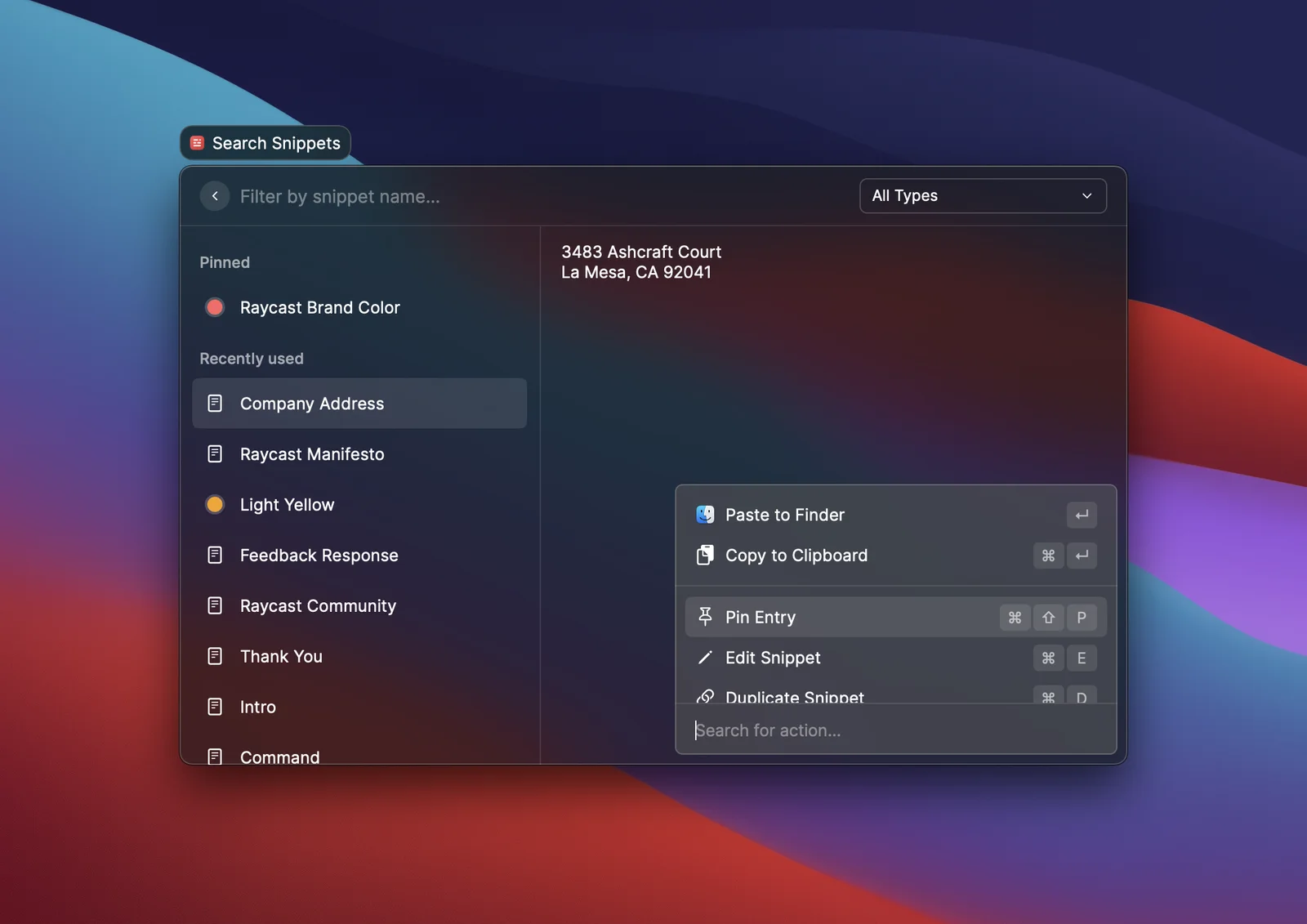
Official product illustration: Raycast. The sample entries belong to the maker’s demonstration.
A snippet should remain easy to inspect before sending. Saving typing is helpful; sending an outdated address or the wrong standard reply is not. I would keep the collection small enough to understand and expand it only when another repeated task appears.
Quicklinks: give a destination a clear name
The Quicklinks manual describes shortcuts for websites, files, folders and search URLs, with placeholders for input. I find the idea especially appealing for project work: a named destination is easier to recall than a long path or a crowded row of bookmarks.
I would begin with a few destinations I repeatedly need. One could open a project folder; another could reach an issue tracker or search a documentation site. Those are examples of how I would organise the feature, rather than a claim about time saved in a measured test.
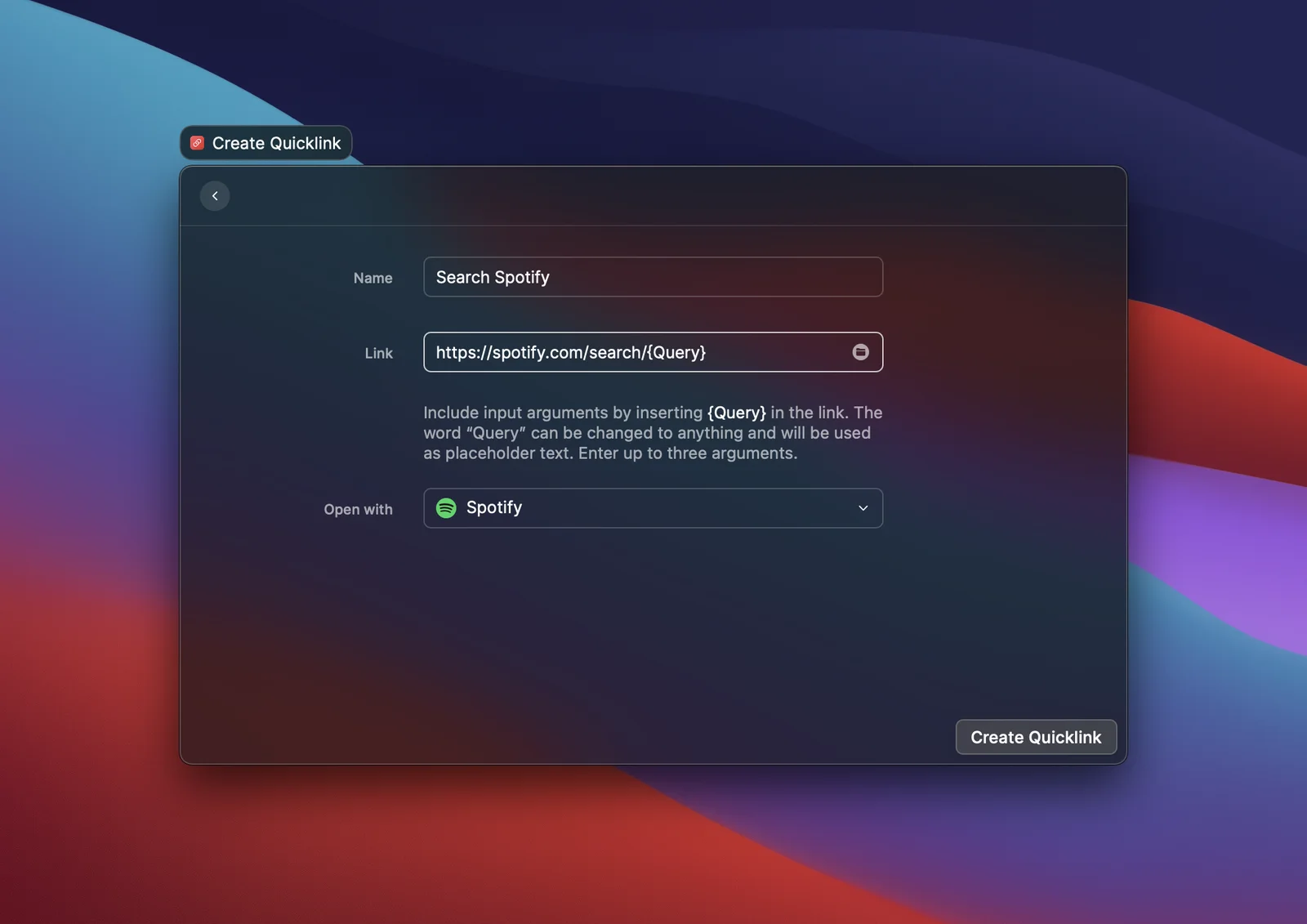
Official product illustration: Raycast. This is an example configuration from its website.
The extra control also creates a little maintenance. A destination can move, a project can end and a shortcut name can stop making sense. I would remove old links rather than treat the collection as an archive. A short useful list is the goal.
Related reading

Pro has to earn its place beside the free plan
The official pricing page, checked on 8 November 2026, separates the free tools from paid features. The free plan already includes important everyday functions. Paid plans add features such as Cloud Sync, longer clipboard retention and AI access, with different allowances. Individual and team plans also have different terms.
I would compare the billing period, included AI credits and renewal terms before subscribing. I am not quoting a checkout price here because the relevant total depends on the chosen plan and billing arrangement. The current page is the right place to check it.
My own rule is simple: pay for a feature I can name. If I cannot explain what the paid plan adds to my working week, I would keep the free version. That is still a useful outcome. A free tool that fits is better value than a paid plan kept only because cancelling feels inconvenient.
Cloud Sync does not mean clipboard sync
There is an important distinction in Raycast’s Cloud Sync manual. It describes syncing items such as Snippets, Quicklinks, Notes and supported settings through a signed-in Pro account. It explicitly lists Clipboard History among the data that stays on the device. A longer local clipboard history is a different benefit from moving copied contents between machines.
That limit changes the purchase decision. I would consider Pro if keeping the supported setup consistent across computers solves a real problem. I would not buy it expecting Raycast Cloud Sync to move my whole clipboard between a Mac and a PC.
The manual also separates current and legacy sync arrangements. Before relying on a mixed setup, I would check the exact application versions and supported categories, then keep an export of the configuration. The word “sync” needs a clear object: what is being synced matters.
AI is convenient, with terms worth reading
Raycast’s Pro page presents AI tools inside the launcher. I can see the appeal of asking a question without opening another application. For short explanations or text changes, staying near the original task may be useful.
I would still treat the answer as an answer to review. A convenient interface does not make generated text correct. For code, the important check remains whether the result fits the project and behaves as expected. For writing, I want the meaning and voice to survive the edit.
The current plans use AI credits and different model access. I would compare those terms with the separate AI services I already use, rather than assume that a subscription means unlimited access to every model. I would also check what information is sent before using any cloud feature with private work.
My recommendation does not depend on a particular model name. Models and allowances can change faster than the local workflow. I am more interested in whether the surrounding interface remains useful when the novelty of the AI feature wears off.
The drawbacks I would weigh
There is setup work before a launcher becomes familiar. Aliases, hotkeys, permissions and extensions are all choices to maintain. I would resist the temptation to copy a large configuration just because it looks impressive. It can create more decisions than it removes.
Extensions also deserve individual attention. A tool connected to an outside service depends on that service and on the extension being maintained. I would check the specific integration I need before replacing an existing workflow. A large store cannot promise that every entry fits every machine or account.
Raycast is also a common entry point for several jobs. I enjoy that idea, but I would keep a straightforward route to the underlying app or file. Good integration should make work easier without making ordinary tasks difficult to reach another way.
What I would choose instead
I would keep Apple’s Spotlight if launching apps and finding a few items already covers the job. Learning a more capable launcher is optional; the benefit should come from the tasks it adds.
Related reading

I would consider Alfred if an existing Alfred workflow already does what I need. Rebuilding a working system is a real cost. Raycast’s presentation and shared interface may appeal to me, but that alone is not a reason for everyone to migrate.
I would choose a dedicated clipboard manager, text-expansion tool or window utility when one of those jobs matters much more than the rest. A specialist app can be a better fit than a broad launcher. Raycast is most attractive to me when bringing several modest jobs together is itself useful.
This article focuses on the Mac workflow. Raycast also has a Windows version. I would check that version’s current feature support and required operating system separately rather than assume that both platforms work identically.
How I would make the decision
Start with the free tools and a small setup. Choose a hotkey that is comfortable, add a few useful destinations and save one piece of text that keeps being typed. Then notice whether the application becomes a natural place to look for those jobs.
Before paying, identify one paid feature that solves a recurring problem. It might be a supported sync category, longer local clipboard retention or the convenience of the AI interface. Compare that benefit with the current plan, including its limits. I would skip Pro if the free version already covers the whole job.
My verdict is positive about the idea and careful about the subscription. I like a common, searchable home for small tasks. I would recommend exploring Raycast’s free version first, and considering Pro when its specific additions have a clear role. The everyday tools are the strongest reason to start; the paid plan should earn the next step.
What worked
- The free launcher makes it possible to evaluate the core routine before paying.
What bothered me
- Do not buy Pro expecting clipboard-history sync or unlimited AI.
Who should not buy it
- I would skip Pro when the free plan already covers the required routine.
Alternatives I would consider
- Raycast Free. I would start with the free launcher and choose Pro only when its specific paid features earn a place in the real workflow.
Evidence and sources
Official documentation supports the plan and feature comparison. The three local images are Raycast's product illustrations, not captures of my personal setup.
Features, compatibility and rated figures from the maker are manufacturer information. My opinions are identified in the review.
Conclusion
Pro is worth comparing only when a specific paid feature earns its recurring cost.
Raycast Pro for Mac; compare its current paid plan with Raycast Free
Raycast · Choose the local store or delivery region
Check price and availability: Raycast Pro for Mac; compare its current paid plan with Raycast Free at RaycastProduct link.
One email a week with practical Mac workflows, useful comparisons and honest tech recommendations.