I like backup software that talks about recovery as clearly as it talks about making a copy. O&O DiskImage 22 Premium interests me because the main choices have plain jobs: protect the whole PC, protect a drive, protect selected files, or return to an existing backup. That structure is a good place to start.
Quick verdict
I like DiskImage 22 Premium for treating recovery as part of the backup decision.
- Best for
- Windows users planning image backups, file protection and a way back after failure.
- Main benefit
- I like the clear distinction between a whole-PC image, selected files and recovery.
- Biggest drawback
- A successful backup job is not proof that the recovery route will work when needed.
O&O DiskImage 22 reviewed; current offer may supply a newer major version
O&O Software · Choose the local store or delivery region
Check price and availability: O&O DiskImage 22 reviewed; current offer may supply a newer major version at O&O SoftwareProduct link.
Reviewed version: O&O DiskImage 22 reviewed; current offer may supply a newer major version
Compatibility: Windows software. The review covers the named supplied version; a current store or download can offer a later version with different licence terms.
Review context: The review focuses on Windows users planning image backups, file protection and a way back after failure.
O&O Software provided a free Premium licence for this review. My overall opinion is positive, and I enjoyed the product’s practical focus. This is a review of version 22. O&O’s release list now also includes DiskImage 23 Premium, so a current purchase link may lead to a newer version than the supplied licence. Version history.
I want that distinction visible because backup is a long-term purchase. The version, supported system and recovery route matter after the original installation. A familiar product name is useful, but it should not hide the details needed to plan the way back.
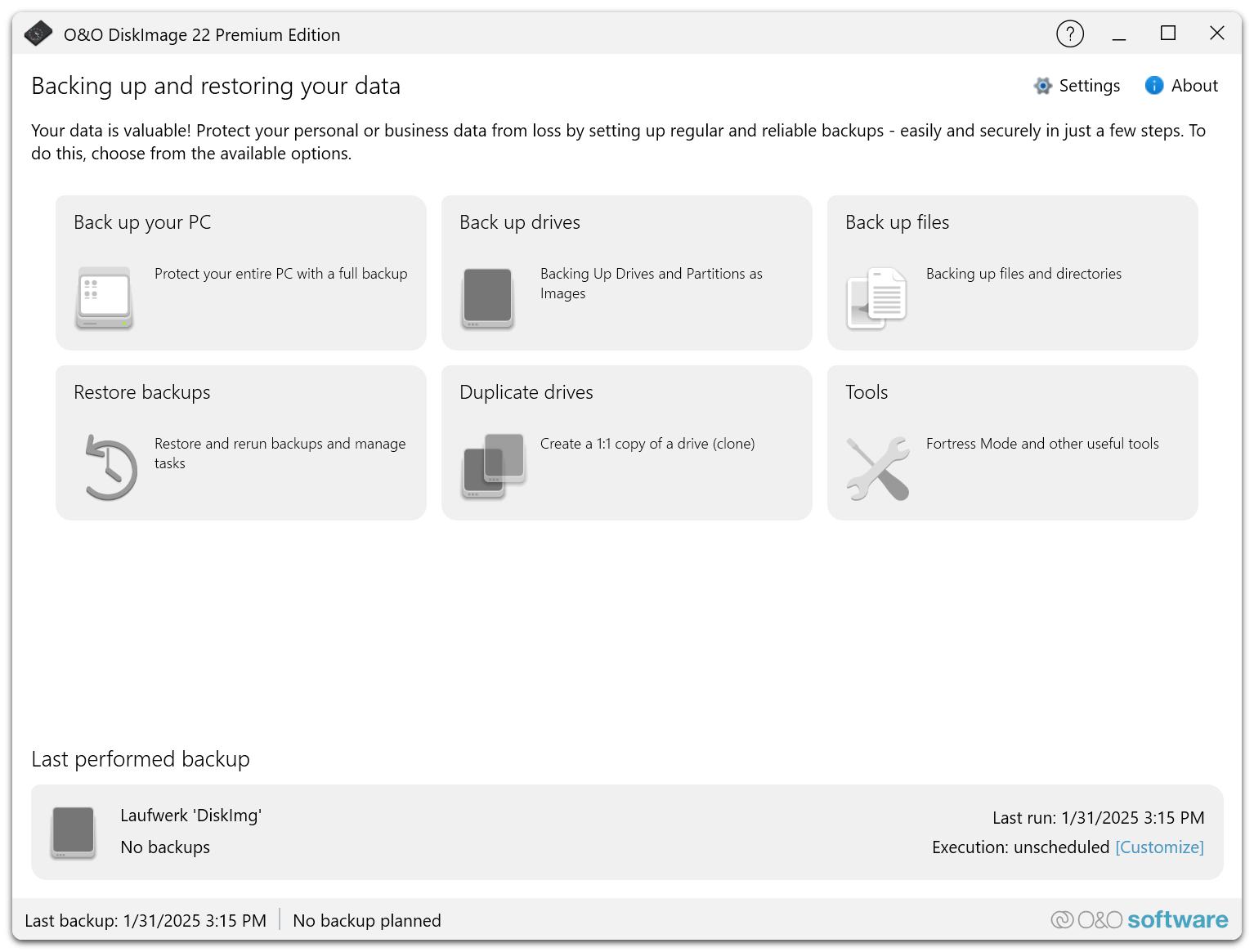
The start screen asks the right question
The official version 22 interface separates a whole-PC backup from drive imaging and file backup. I like that these are different choices. A person who needs one lost document has a different problem from someone replacing a failed system drive.
A whole-machine image preserves more of the system than a folder copy. That is useful when the aim includes the operating system, apps and their settings. It also creates a larger backup file to store and manage. I want to choose how much I copy on purpose.
Related reading

File backup has a narrower purpose. It can be easier to understand when the priority is a set of working folders rather than the complete Windows environment. I prefer software that lets the user make that distinction before pressing the button. The clearest interface is one that helps choose the right job, not merely the fastest route to starting any job.
A backup destination deserves its own decision
The source is the data being protected. The destination is the place that must remain useful when something goes wrong. Those roles sound obvious, but a simple interface should make them hard to confuse. I like seeing the target as part of the job rather than as an afterthought.
A second file on the same physical device does not have the same value as an independent copy elsewhere. If that device fails, both may disappear together. The useful question is what event the setup is supposed to survive: a deleted file, a lost computer or a damaged drive.
That is why I would plan storage before scheduling the software. Storage space, access, how long copies are kept and the way to restore them are part of one decision. The application can organise a backup task, but it cannot supply a sensible destination by itself. DiskImage is most appealing to me when it sits inside that clear plan.
Version 22 makes existing backups more accessible
O&O’s version 22 announcement describes opening backups as drives in Windows and creating or converting backups to VHDX. I like the direction of those features. A backup becomes more useful when getting one file back does not require treating every recovery as a complete machine rebuild.
The two routes still serve different needs. Opening an image as a drive makes it easier to browse its files. A virtual-disk format offers another way to work with a stored environment. Neither should be read as a promise that every application, licence and part that depends on the hardware behaves identically in every setting.
For me, the value is access. The copy should remain something that can be understood and used, not an opaque object that sits on a disk until an emergency. Giving backup contents a practical route back into Windows is a feature I genuinely like.
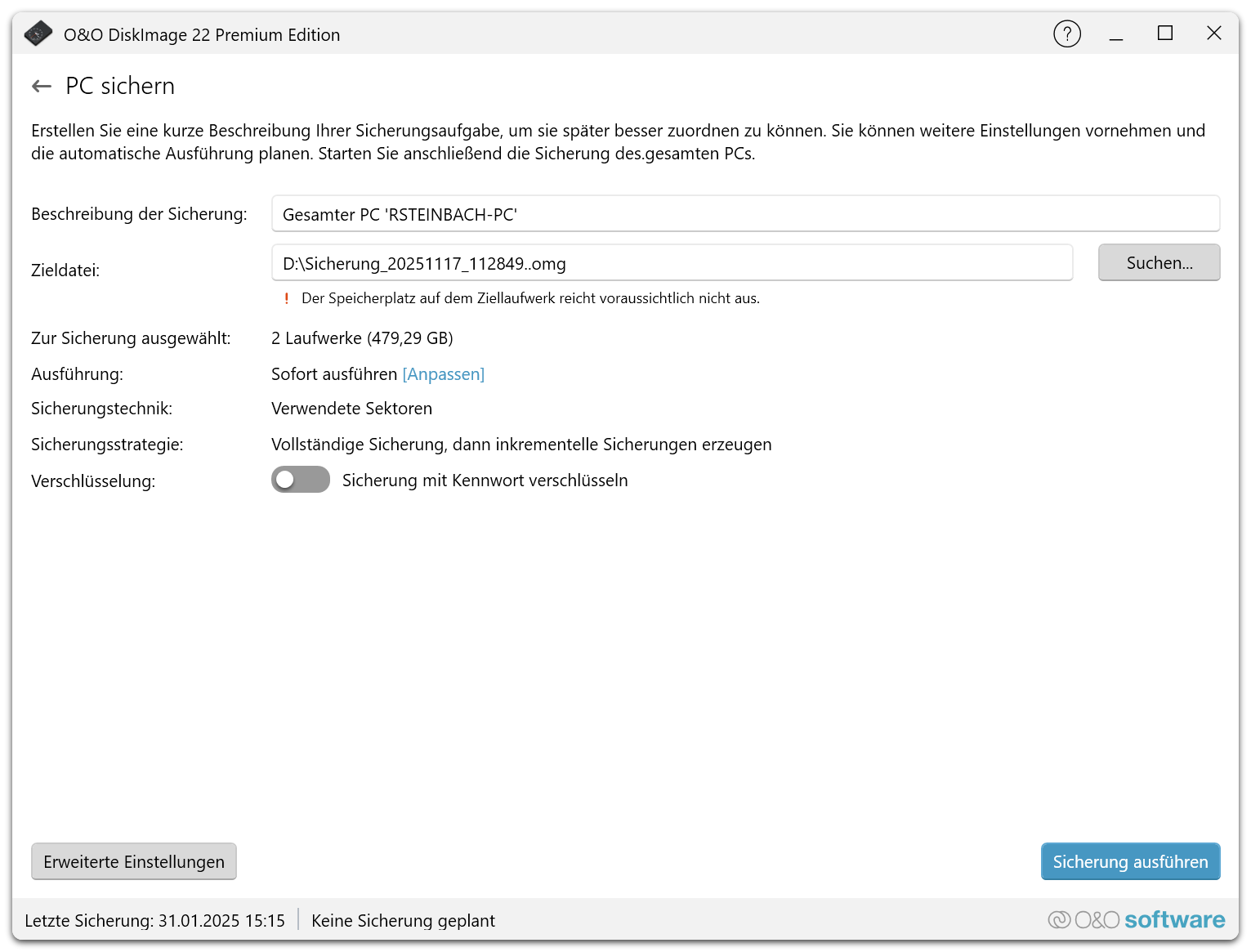
Scheduling is useful when the result is visible
The version 22 release material describes central management for backup jobs, reports and rules for keeping old copies. It also describes checks for incomplete or damaged backups and conflicts with undersized targets. These are O&O’s stated functions for the release.
I like that the management side gets attention. An automatic job has little practical value if no one can tell whether it completed. The schedule is the intention; the result is the evidence. A useful backup routine needs both.
Choosing how long to keep copies is part of that same routine. Keeping every copy forever can exhaust the destination. Keeping only the newest copy can make it harder to return to a point before a problem was noticed. The right balance depends on the files and the available storage. I want the rules to be visible enough to revisit as the workload changes.
Recovery media belong in the plan from the start
O&O describes boot media for restoring a system when ordinary Windows startup is unavailable. The DiskImage 22 support information lists 64-bit Windows 10 and Windows 11 and says that internet access is required for activation and use of the Windows PE recovery environment.
Related reading

That is a concrete requirement worth understanding early. The environment used during a recovery may be different from the comfortable desktop where the backup was configured. Network access, storage access and the files needed for the job all have to be considered together.
I like that recovery is a named part of the product, but I would make it a named part of the household or business procedure too. The important question is how the person doing the restore reaches the right backup and identifies the right target. A well-chosen product is one part of that process, not a reason to leave the process unwritten.
A backup check and a restore answer different questions
A backup program can inspect the stored data for the kinds of problems its checks cover. That is useful. A recovery rehearsal answers a broader question: can this person, with this machine and these resources, actually return the required data to a usable state?
I want those questions kept distinct. A good backup-check result is not the same thing as a completed recovery, just as a visible file is not the same thing as an application opening the document correctly. The right check depends on what the backup is meant to protect.
For files that matter, the useful end point is being able to open the restored files. For a system image, it includes the startup and app needs. I like DiskImage’s clear recovery focus because it encourages that bigger view, while leaving room to define the actual outcome that matters.
Encryption adds another thing to preserve
The official backup setup image includes an option for password protection. I like having security choices where the backup is defined, rather than hiding them somewhere unrelated. A stored image may contain far more private information than the user remembers at the moment of creating it.
A password also becomes part of recovery. If the only record of it is on the failed computer, the backup plan has a new weak point. The person responsible needs a safe way to keep the information needed to unlock the copy.
The same applies to access rights and shared storage. A backup that exists but cannot be reached under a failure may not solve the problem it was made for. These are ordinary planning details, and I prefer discussing them directly to treating encryption as a badge that completes every security decision.
The European privacy angle is practical
For a business handling personal data, a backup strategy is more than a convenience. GDPR Article 32 includes the ability to restore availability and access after an incident and regular evaluation of security measures. That duty concerns what the organisation does as a whole, not one software brand.
I would not call a company compliant because it owns DiskImage. The useful part is a tool that can support a clear backup and restore plan. Access, how long copies are kept and how personal data is handled still need clear rules.
That is a positive role for the software. A product does not have to become a legal guarantee to be useful. Clear jobs, records and a route to recovery are concrete parts of responsible data handling, and they are much easier to assess than a broad promise printed on a product page.
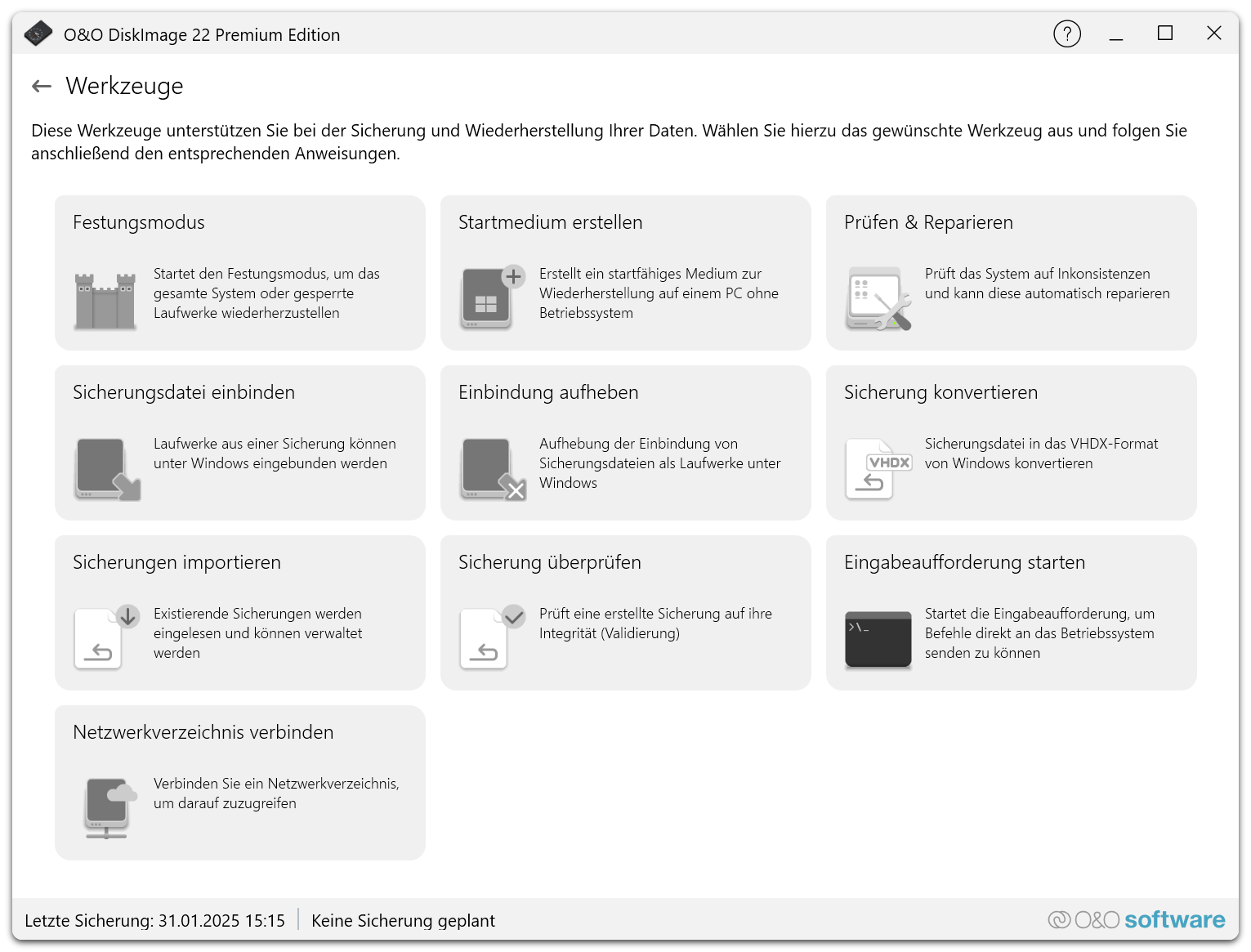
Related reading

Why I like the product
DiskImage 22 Premium appeals to me because it gives the different backup jobs a clear structure. I like the separation of a complete PC image from file protection, and I enjoy seeing recovery treated as part of the same product rather than a distant extra.
The useful buyer is someone with a real Windows backup need and a destination and recovery plan to match. The licence here is Premium version 22; the current catalogue also has version 23. I would check the exact offer and upgrade terms instead of assuming the supplied version and today’s store page describe one identical purchase.
My verdict is positive. I like the practical design and the attention to managing existing backups. Its value comes from helping build a dependable way back to the files and working environment that matter. That is a strong reason for me to value a backup tool: a clear plan for protecting files and finding the right recovery route when something goes wrong.
Product images: O&O Software, version 22; the PC configuration screenshot is in German. Current DiskImage product page and release history.
Where to buy
See O&O DiskImage 22 at the official product page. This is the product page for the model covered in this review. Check the model number, colour, included parts and delivery options before ordering. Prices and stock can change, so I use this page for the current offer. Matching the product to the review matters more to me than finding a similar name.
What worked
- I like the clear distinction between a whole-PC image, selected files and recovery.
- Whole-machine and file protection answer different needs, and the product gives those jobs a clear structure.
What bothered me
- A successful backup job is not proof that the recovery route will work when needed.
- A current store or download page may concern DiskImage 23 rather than the supplied version 22.
Who should not buy it
- Someone with no backup destination or recovery plan, or someone looking for a native Mac backup app.
Alternatives I would consider
- File backup for a narrower need. I would choose a file-focused backup when the priority is a set of folders, and a system image when the Windows installation and applications are part of the recovery goal.
Evidence and sources
The article separates my judgement from specifications and claims credited to their sources. Product images are identified by the credits in the article.
Features, compatibility and rated figures from the maker are manufacturer information. My opinions are identified in the review.
Conclusion
Worth considering for a defined Windows recovery plan; check the current version and upgrade terms.
O&O DiskImage 22 reviewed; current offer may supply a newer major version
O&O Software · Choose the local store or delivery region
Check price and availability: O&O DiskImage 22 reviewed; current offer may supply a newer major version at O&O SoftwareProduct link.
One email a week with practical Mac workflows, useful comparisons and honest tech recommendations.