A premium headphone can become an uncertain used purchase when the battery and ear pads have aged. The Bose QuietComfort 35 II is an older noise-cancelling model, so that is the starting point today. Its reputation may explain why people still search for it, but a reputation cannot tell you whether the individual pair on sale charges properly, fits comfortably, or includes the cable you need.
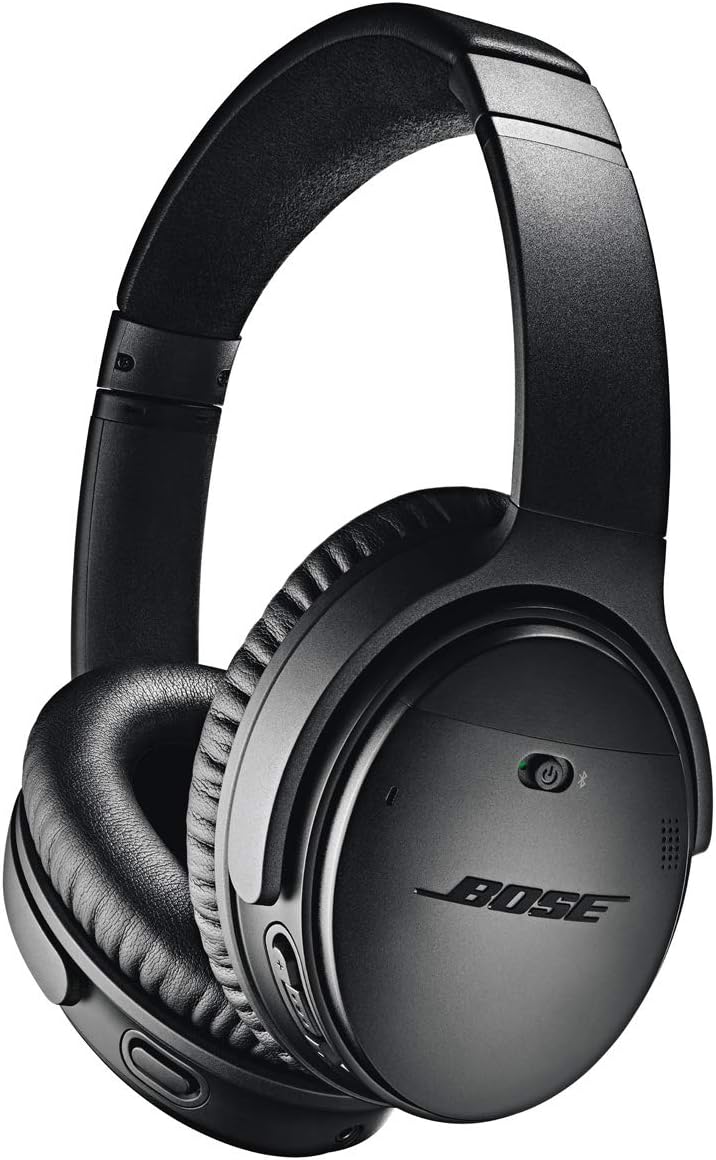
This is a research-based review of the QuietComfort 35 II associated with Amazon ASIN B0756CYWWD. I have not worn a review unit, measured its noise cancellation, recorded calls, or tested battery life. Bose’s specifications and the exact product listing support the feature discussion. Personal comfort and the condition of an individual older pair remain questions to check directly, rather than qualities I can establish from the model name.
Read the condition description closely
A listing can offer new stock, used equipment, or a refurbished pair under different terms. Check what refurbished means to that seller, whether the battery has been assessed, which pads are fitted, and what the warranty covers. A cleaned exterior and a reset Bluetooth list do not demonstrate battery health. For an older product, clear return terms are a practical part of the value.
Ask whether the original carrying case, charging cable, and audio cable are included. Replacing missing parts changes the real price and may create compatibility questions. Photographs should show the actual pair when buying used, including the headband, hinges, pads, connectors, and labels. If the seller cannot describe the condition beyond works fine, treat that as limited evidence rather than a reason to imagine the best possible example.
Related reading

Keep the generation clear
The QC35 II is not a QC45, a current QuietComfort, or an Ultra model. Bose describes Bluetooth listening, active noise cancellation, and app-related controls for this generation. Its specifications list a micro-USB charging connection and a manufacturer wireless battery claim of up to 20 hours. Those details come from Bose’s QC35 II specifications and the exact Amazon listing, not my own tests.
Old product pages may mention services or initiatives from the time of release. Do not buy the headphones expecting every historical voice-assistant or software feature to remain available. Check current Bose support and the phone platform you intend to use. The useful core is a headphone that can connect and serve your listening needs now. A discontinued marketing feature should not carry weight in the price you are willing to pay.
Comfort needs your own head
The QuietComfort name is a product identity, not a guarantee that the fit suits everyone. Head shape, ear size, glasses, hairstyle, and the state of the pads affect a long session. Try the headphones for the kind of journey or work period you actually expect. A quick fitting can miss pressure or heat that becomes noticeable after half an hour.
Adjust the headband and check whether the pads surround your ears without forcing an awkward position. If you wear glasses, test with them. Notice whether you have to hold the cups in place to get a consistent seal. A used pair with compressed or damaged pads may behave differently from one with correctly fitted replacements. Condition is therefore relevant to both comfort and acoustic behaviour, not just appearance.
Ear pads are part of the system
Inspect pads for tears, flaking, flattening, and poor attachment. A bargain pair that needs new pads should be priced with that work included. Use replacement parts with a clear compatibility description, and follow Bose’s instructions for installation. Do not assume every inexpensive pad advertised for a similar model will preserve the same fit or listening balance.
Clean the headphones according to the maker’s guidance and avoid soaking the pads or getting liquid into the cups. A shared or used headphone deserves particular attention before long contact with skin. If the pads remain unpleasant or the headband is badly degraded, consider whether the total restoration cost still makes sense. The aim is useful comfortable service, not rescuing old premium equipment at any price.
Test noise control in a real setting
Active noise cancellation is a central reason to consider the QC35 II, but I cannot rank its effectiveness without a unit and a defined comparison. Try it in the environment that matters to you, at a sensible playback level. A steady ventilation sound, an office conversation, and outdoor wind are different problems. One favourable demonstration does not establish identical performance against all of them.
Check how you feel with the available noise-control settings. Some listeners prefer one setting for a quiet room and another for travel. If you experience discomfort, stop and reassess rather than forcing a long session because the model is well known. Noise cancellation also is not a substitute for appropriate awareness near traffic or other hazards. Choose the listening arrangement around the situation as well as the desired quiet.
Related reading

Battery age is the main unknown
The original up-to-20-hour claim describes a test condition for a healthy product, not the remaining capacity of a pair bought years later. Ask for evidence of present runtime if buying used, and test your own normal session promptly. Calls, volume, settings, and battery age can change the result. A pair that lasts one short demonstration may still fail the long journey that motivated the purchase.
Check charging behaviour and the micro-USB socket for damage. Use the correct cable and supply arrangement according to the instructions. Do not assume that a premium brand makes a worn connector harmless. If battery service is needed, check the current manufacturer or qualified service options and cost before buying. I would not promise an easy user battery replacement without verified instructions for the exact unit.
Pairing should be predictable
Start with one phone or computer and confirm ordinary listening before adding another. Check the selected output in the operating system and in any application that has its own audio settings. Then test the actual sequence of switching sources that you expect to use. A feature that supports more than one remembered device does not guarantee that every application will hand over audio in the way you prefer.
For a Mac and phone combination, try a phone call while the computer is available and observe which device takes the connection. Practise returning to the computer afterwards. This is a return-period test, not a result I can claim here. If the switching behaviour creates frequent interruptions, a newer product or a simpler one-source setup may serve you better even if the older headphones sound satisfactory.
Calls need a separate judgment
A headphone that is pleasant for music may still be unsuitable for frequent work calls. The microphone has to transmit your voice clearly from the ear cups while dealing with the surrounding room. Make a real test call and ask the other person about clarity, background sound, and changes when you turn your head. Do not use your own listening impression as evidence of what the microphone sends.
Compare a quiet room with your normal working environment. If the result is inconsistent, check the selected microphone, Bluetooth mode, and app settings before drawing conclusions. For critical meetings, a dedicated microphone or headset may be a more useful choice. An older premium listening product does not have to solve every communication task to remain useful, but its role should be clear.
Wired listening is worth checking
The supplied audio cable can provide another route for compatible sources, but read the manual for the functions available in each power mode. Do not assume the Bluetooth microphone works through a simple analogue cable or that all active processing behaves identically with power off. Test the exact source and cable you plan to take on a journey.
Keep the cable and any required device adapter in the carrying case. If travelling, inspect them before leaving rather than discovering the wrong connector when the battery is empty. The practical attraction of a backup connection is readiness. A missing proprietary-end cable or an adapter left on a desk can make a supported feature irrelevant at the moment it is needed.
Compare the complete cost with newer choices
Add replacement pads, missing cables, possible battery service, and the value of a clear warranty to the offered price. Then compare with a current supported headphone that fits your requirements. The QC35 II’s old launch price is not the useful reference point. An older premium product can be good value, but the margin needs to be large enough to account for its condition and remaining service life.
Related reading

For an existing owner with a healthy pair, careful maintenance may be more economical than replacing it simply because the model is old. For a new buyer, I would be more cautious. You are choosing a specific physical example, not the best version of a historical review. Clear evidence of condition is what turns that decision from nostalgia into a practical purchase.
My verdict
I would consider a well-described QC35 II at a suitable price when comfort, condition, and present runtime have been checked. I would avoid an unidentified used pair with uncertain battery health or missing essential parts. A current product with straightforward support may cost more initially and still be easier to own.
The QC35 II should be assessed as an older tool with potential remaining value. Confirm the basics, test the intended routine, and spend according to the individual pair’s condition. That gives a more honest answer than repeating old praise as though every unit being sold today has a fresh battery and untouched pads.
Check the exact Bose QuietComfort 35 II Amazon listing. This is an affiliate link. As an Amazon Associate I earn from qualifying purchases. Confirm condition, battery coverage, accessories, seller, and return terms before ordering.
One email a month: new articles, reviews and the upcoming live webinar + free recording. No spam, unsubscribe anytime.