I like this AlzaPower AluCore cable, and I am glad I bought it. A good HDMI cable should become uninteresting after you connect it. The picture appears, the sound takes the right route and the cable stays out of the way. The AlzaPower AluCore Premium HDMI 2.1 cable is a 2m option aimed at modern displays, but the useful question is not how many impressive terms fit on its product page. It is whether it is the right link between the two ports you own.
Quick verdict
I recommend this 2m AluCore cable for a known HDMI connection that needs its length and physical design.
- Best for
- A short display or TV route with compatible HDMI ports.
- Main benefit
- I like the focused 2m format, braided cable and metal connector housings.
- Biggest drawback
- A cable cannot add a display mode that the connected ports do not support.
AlzaPower AluCore Premium HDMI 2.1 High Speed 8K 2m
Alza Czechia · Czechia
Check price and availability: AlzaPower AluCore Premium HDMI 2.1 High Speed 8K 2m at Alza CzechiaProduct link.
Reviewed version: AlzaPower AluCore Premium HDMI 2.1 High Speed 8K 2m
Compatibility: Match both connectors, the required length and the intended mode. The source, cable and destination must all support the same job.
Review context: The review focuses on a short display or TV route with compatible HDMI ports.
We bought this cable ourselves. The exact version is the black 2m AluCore Premium listed by Alza. Cable length and version matter, so I would not treat a shorter model or a similar-looking older cable as the same purchase.
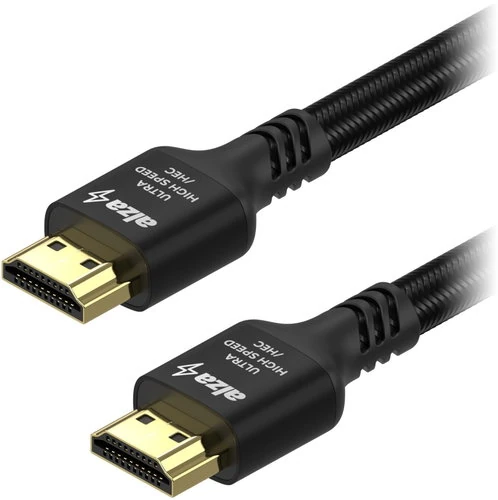
Product images: AlzaPower and Alza.
Start with the devices, not the cable name
The Alza listing describes HDMI connectors at both ends, a nylon braid, metal connector housings and a claimed bandwidth of up to 48Gbps. Those details describe the cable’s intended job. They do not tell you what your computer, dock, receiver or display can send and receive.
Related reading

A connection is a chain. The source needs to offer the display mode, the receiving port needs to accept it and any device between them needs to pass it through. A more capable cable cannot add a missing feature to a port. This sounds basic, but it is the most useful way to avoid spending money on the wrong part of a display problem.
That matters especially with a dock. It is tempting to blame the visible HDMI lead because it is easy to replace. The dock may have its own limits, and the computer connection may impose others. Before buying anything, I would identify the exact path from computer to screen, including every adapter. A cable makes sense as a replacement only when the rest of the path is understood.
I would also check which HDMI socket is in use on a television or monitor. Similar-looking sockets do not always offer identical features. The right connection may be one port rather than another. A cable review should not promise that a product label removes the need to read the display’s own documentation.
8K on the box is not the whole story
The cable is advertised for 8K output, but many buyers will use it for a lower resolution with other demands. Refresh rate, colour format and dynamic range are all part of a display mode. The useful goal is the combination your equipment supports, rather than choosing the largest resolution printed on the packaging.
For a desk setup, a clear and stable picture at the intended refresh rate can matter more than a theoretical maximum you will never use. Text work, games and films create different priorities. A person buying a cable for a computer monitor should think about their actual desktop mode, rather than assume a television-oriented headline tells the complete story.
The same applies to HDR. A cable does not make a poor display look better simply by supporting a term in a standards list. The source, content and display all contribute to the result. I would treat the cable as a transport choice, rather than an image enhancement accessory. That keeps expectations sensible and makes troubleshooting more direct.
There is also no reason to replace a working cable just because a new label sounds more modern. If the current connection already delivers the mode you need without problems, a different braid or metal shell is unlikely to make the picture more detailed. A digital connection deserves a practical buying decision, not an imaginary ladder of visual richness based on price.
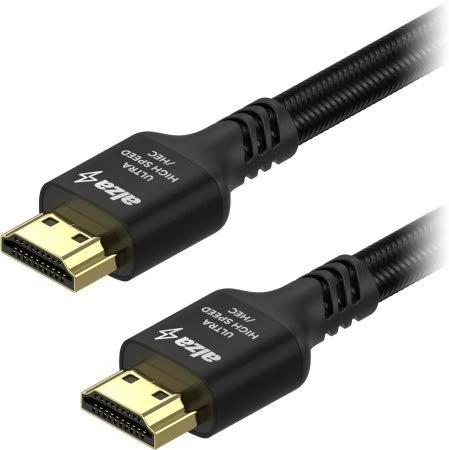
The 2m length is part of the design
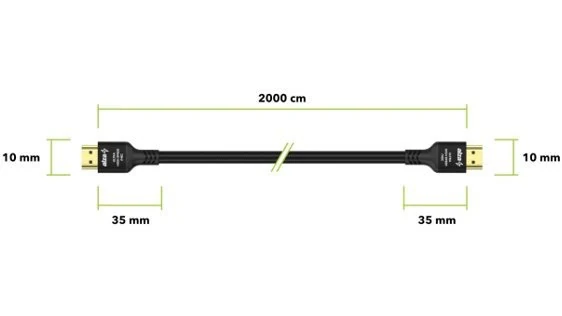
Two metres is useful when a device sits near a display but the cable still needs to travel around furniture. The route is rarely a straight line. A lead may need to pass behind a desk, around a monitor arm or down to a computer placed on a shelf. Buying by direct distance alone can leave too little slack at the connectors.
Slack should have a purpose. Too little can pull on a port when a display moves. Too much can become a tight bundle behind equipment or make it hard to tell which lead belongs to which device. I prefer enough spare length for ordinary movement and easy access, without choosing a much longer cable simply because it costs little more.
Related reading

I like the braided finish as part of the object. The braid is a physical feature, rather than a guarantee about every possible use. It can make a cable easier to handle and give it a tidy appearance. It can also affect how readily the lead bends around a corner. The right routing should respect the cable’s natural curve and leave room behind the connector housing.
Metal connector bodies are similarly a mixed practical choice. They can feel more substantial, but a large shell can be awkward in a recessed port or beside another connector. The photograph and the available space behind your equipment deserve attention. A cable should fit the socket area, not merely the electrical specification.
Keep the connector free of strain
The small socket on a computer or television is part of a much more expensive device. I would avoid letting a hanging cable or a tight turn put constant leverage on it. Supporting the cable route makes more sense than choosing a heavier connector and assuming that weight means strength everywhere in the system.
This matters with moving desks and monitor arms. The cable needs enough freedom for the full range of movement, not only the position used when it was installed. A neat setup at one height can become a strained setup at another. Checking the route through that movement is a simple way to make the installation more deliberate.
I would label the ends if several similar leads share the same area. The value is not aesthetic. It makes a later change easier and reduces the chance of unplugging the wrong device. A cable that is easy to identify can be more useful than a slightly prettier cable hidden behind the same equipment.
For portable use, I would coil it without forcing a tight fold at the plug. A 2m braided lead takes a meaningful amount of room in a bag. It is a good choice when you need that length, but a permanent desk cable and a travel cable do not have to be the same object. Choosing for the actual role is simpler than trying to make one lead ideal everywhere.
A sensible way to approach a display problem
When a connection behaves badly, I prefer changing one thing at a time. A different cable can help identify whether the lead is involved. Changing the cable, dock, display settings and computer port together makes the outcome harder to understand. The goal is a stable setup and a clear reason for it, rather than a pile of spare parts.
It also helps to separate a missing picture from an unwanted display mode. A connection that works at one setting but not another creates a different question from a device that never appears. That distinction directs attention toward the path’s capabilities as well as the cable. It stops the accessory from becoming the default explanation for every screen issue.
Certification language deserves care. Alza uses certification terms in its description, but the cable’s product name should not be treated as a substitute for checking the exact package and its verification details. I would buy from a retailer with clear product identification and a usable return route. That is more practical than trusting an unrelated badge shown in a marketplace image.
Related reading

None of this makes an ordinary cable purchase complicated for its own sake. It makes the purchase smaller. Once the required mode, ports and length are known, there are fewer relevant choices. The cable only needs to connect those requirements reliably. A long list of supported features is less important than the few your setup actually uses.
My verdict
I have enjoyed this purchase. The 2m AlzaPower AluCore is a sensible candidate for a short, deliberate HDMI route where you want a braided cable and metal housings. Its useful selling point is the intended capacity of the connection, not a claim that an expensive cable improves a picture that already works correctly. I would buy it to meet a known requirement or replace a lead that is part of a diagnosed problem.
I would keep an existing cable that already handles the required mode. I would also look elsewhere if the connector body or 2m length did not fit the installation. Physical fit and a relaxed cable route are real requirements, even if they look less exciting than 8K in a product title.
See the exact 2m AluCore Premium HDMI listing and compare it with the documentation for your source and display. The right result is a cable you connect once and then have no reason to think about.
Where to buy
See AlzaPower AluCore Premium HDMI 2.1 High Speed 8K 2m at Alza. This is the product page for the model covered in this review. Check the model number, colour, included parts and delivery options before ordering. Prices and stock can change, so I use this page for the current offer. Matching the product to the review matters more to me than finding a similar name.
What worked
- I like the focused 2m format, braided cable and metal connector housings.
- Choosing the exact length and connector shape is more useful than treating an 8K label as a picture-quality upgrade.
What bothered me
- A cable cannot add a display mode that the connected ports do not support.
- The connector bodies and cable route still need physical clearance.
Who should not buy it
- Someone replacing a working cable only to make an already correct picture look sharper.
Alternatives I would consider
- Your existing HDMI cable. I would keep it if it already carries the required picture and sound mode reliably; the AluCore earns a purchase by meeting a specific missing requirement.
Evidence and sources
The article separates my judgement from specifications and claims credited to their sources. Product images are identified by the credits in the article.
Features, compatibility and rated figures from the maker are manufacturer information. My opinions are identified in the review.
Conclusion
Worth buying for a specific connection requirement; I would keep a cable that already carries the needed signal.
AlzaPower AluCore Premium HDMI 2.1 High Speed 8K 2m
Alza Czechia · Czechia
Check price and availability: AlzaPower AluCore Premium HDMI 2.1 High Speed 8K 2m at Alza CzechiaProduct link.
One email a week with practical Mac workflows, useful comparisons and honest tech recommendations.