What Your Phone Knows About You in a Single Day
6:47 AM: The Day Begins
Your alarm goes off. You haven’t touched your phone yet, but it already knows several things about this moment.
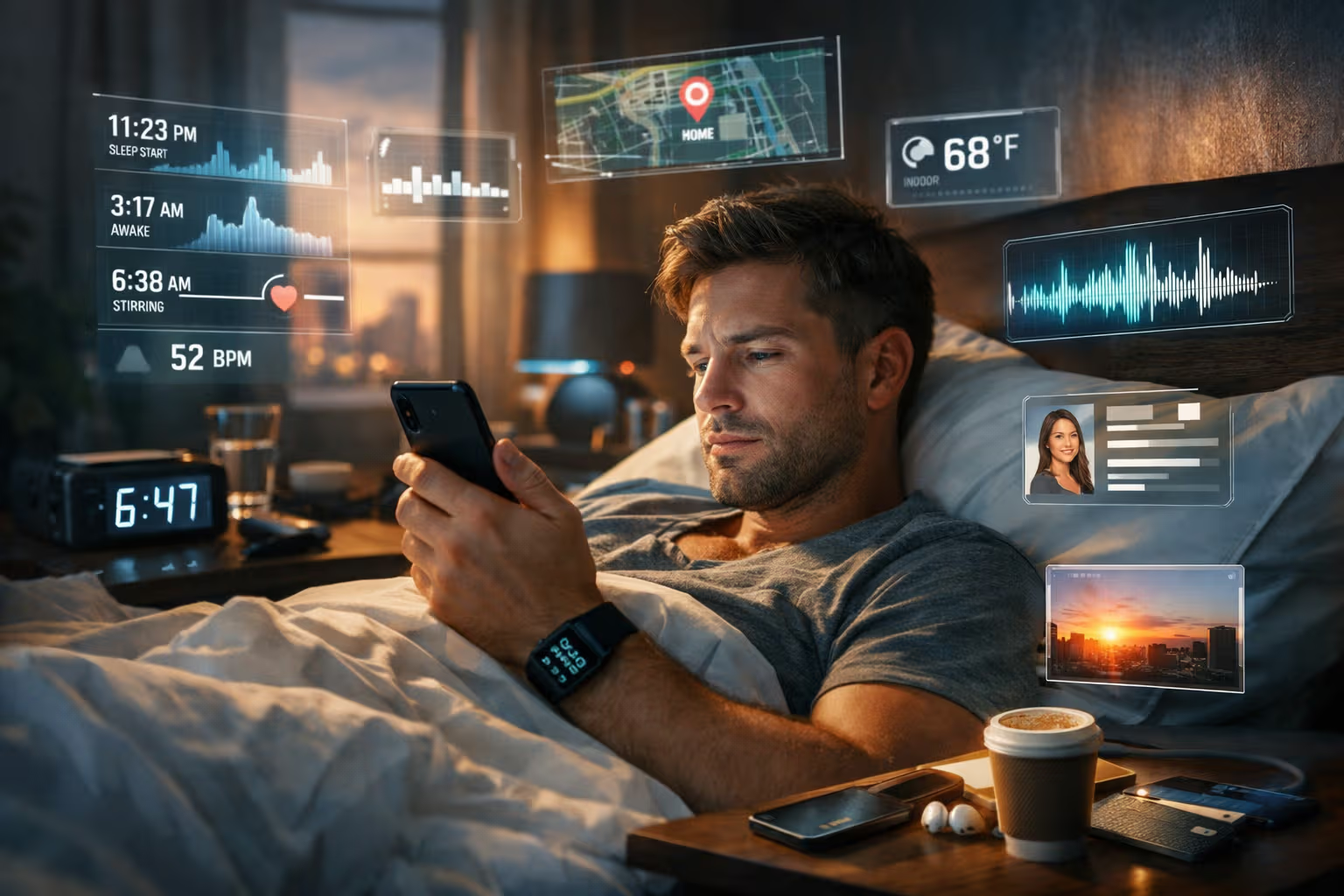
Sleep data collected: Your phone detected when you stopped moving last night (11:23 PM), when your breathing became regular (11:41 PM), when you stirred at 3:17 AM, and when you began waking (6:38 AM, nine minutes before the alarm). If you use a smartwatch, the data is even more detailed—heart rate dips, sleep stages, blood oxygen levels.
Location confirmed: GPS, Wi-Fi triangulation, and cellular tower connections have placed you in your bedroom. The phone knows this is your home. It knows which room you’re in.
Environmental context: The ambient light sensor detected darkness, confirming night. The microphone registered ambient sounds—your air conditioner, street noise levels typical of your neighborhood at this hour.

My British lilac cat, Mochi, wakes me more reliably than any alarm. She has no need for data collection—she simply bites my toe at precisely 6:30 AM. Her surveillance system is entirely analog. Your phone’s is not.
You pick up your phone. Now the data collection accelerates.
6:48 AM - 7:15 AM: The Morning Routine
Biometric capture: Face ID scans your face, analyzing approximately 30,000 infrared dots to create a mathematical representation of your facial geometry. This happens dozens of times daily. The data confirms it’s you, but also captures subtle changes—puffiness from poor sleep, the development of wrinkles over months, the presence or absence of glasses.
App behavior logging: You open Instagram. The app logs: time opened, duration viewed, scroll velocity, posts paused on, posts scrolled past quickly, accounts viewed, stories tapped, reels completed versus skipped, engagement actions taken. This single session generates hundreds of data points.
Network data: Your phone has connected to your home Wi-Fi. This confirms your home location to router-level precision. The router logs your device’s activity. Your ISP can see which services you’re accessing, even if not the specific content.
Typing patterns: You respond to a few messages. Your phone analyzes keystroke timing, error patterns, autocorrect acceptances and rejections. This creates a typing fingerprint unique to you—useful for security, also revealing of emotional state and cognitive load.

Photo analysis: You take a quick photo of the sunrise through your window. The phone captures not just the image but extensive metadata: precise location, altitude, direction faced, device orientation, focal length, exposure settings. AI analyzes the image content—sky, buildings, time of day, window frame. If your reflection is visible, facial recognition runs on that too.
7:16 AM - 8:00 AM: The Commute Begins
You leave home. Your phone tracks every meter.
Continuous location logging: GPS satellites, cellular towers, Wi-Fi networks, and Bluetooth beacons all contribute to tracking your position. The precision is typically 3-8 meters outdoors, sometimes better in urban areas with dense infrastructure.

Transportation inference: Your phone can distinguish walking (1-2 m/s, irregular motion), cycling (3-8 m/s, smooth motion), driving (10-30 m/s, road-following paths), and public transit (predictable routes, characteristic stop patterns). It knows how you get to work.
Route analysis: Over time, your phone builds models of your routine routes. It knows the coffee shop where you sometimes stop, the shortcut you take when running late, the longer scenic route you choose on Fridays. Deviations from routine are flagged and analyzed.
Audio environment: Even when not actively listening, your phone’s microphone can be processing audio for environmental context. Traffic sounds, crowd noise, music playing in stores—these contribute to understanding where you are and what’s happening around you.

Transaction correlation: You stop for coffee. Your phone detects you’ve entered Starbucks (location). Your payment app logs the transaction (time, amount, items). Starbucks’ app logs your order (grande oat milk latte, light ice). The receipt emailed to you is scanned for purchase details. Your credit card company correlates the transaction with your profile.
One coffee generates data for at least six different companies.
8:00 AM - 12:00 PM: Work Hours
You arrive at work. The data collection continues.
Workplace detection: Your phone recognizes your workplace from repeated visits. It adjusts behavior accordingly—different notification settings, different app suggestions, awareness that you’re “at work” for analytics purposes.
Calendar awareness: Your phone knows your meetings. It knows when meetings actually start versus when they’re scheduled. It knows how long meetings run. Over time, it builds models of which colleagues you meet with, how frequently, and for how long.
Email analysis: Your email app processes message content for various purposes—spam filtering, priority sorting, smart replies, and feeding data to AI assistants. The subjects, senders, response times, and content patterns all contribute to your profile.
Communication patterns: Who do you message? When? How quickly do you respond? What’s the sentiment of your messages? Are they getting longer or shorter? More or less frequent? These patterns reveal relationship dynamics, work stress, and life changes.

App switching patterns: You check Twitter, then Slack, then email, then back to Twitter. The sequence, duration, and frequency of app switching reveals attention patterns, work focus, procrastination tendencies, and stress indicators.
Productivity inference: Time spent in “productive” apps (documents, email, coding tools) versus “distracting” apps (social media, games, news) is tracked. Some phones offer weekly reports on this. All phones collect the underlying data.
Health indicators: You’ve been sitting for three hours. Your phone knows (accelerometer is essentially still). If prompted, it might remind you to stand. Either way, it’s logging your sedentary behavior.

12:00 PM - 1:00 PM: Lunch Break
Location shift: You walk to a nearby restaurant. The phone tracks the route, estimates calories burned, and notes that you’re outside your workplace.
Social inference: Two other phones are making the same journey at the same time, then stopping at the same restaurant, then returning together. The phones can infer you’re having lunch with colleagues, even without explicit indication.
Food logging: If you photograph your meal, AI analyzes the food—identifying dishes, estimating calories, noting restaurant environment. If you search for the restaurant beforehand, your interest is logged. If you pay by phone, the transaction is captured.

Ambient conversation: Theoretically, your phone’s microphone could be processing ambient audio even when you think it’s not listening. Certain keywords might trigger advertising profiles. This is controversial—companies deny it—but the technical capability exists.
Photo metadata: You take a photo with your colleague. The phone identifies them (if they’re in your contacts with photos, or if they’ve been in previous photos). It logs the location, the time, and the social connection.
1:00 PM - 6:00 PM: Afternoon Work
The patterns continue. More meetings, more messages, more app usage, more location data, more behavioral signals.

Fatigue detection: Your typing slows in the afternoon. Your scroll patterns change. Response times lengthen. These signals, in aggregate, indicate fatigue. The phone might not explicitly report this, but the data exists.
Focus sessions: You put your phone face-down for 90 minutes to concentrate. The phone logs this too—face-down detection, reduced pickup frequency, longer screen-off duration. Your attempt to escape surveillance is itself logged.
Search behavior: You search for “best restaurants downtown” for an upcoming dinner. This single search reveals: location interest, dining plans, likely timing, potential companions (if you searched “romantic restaurant” or “kid-friendly restaurant”), and budget expectations (if you specified “cheap” or “upscale”).

Voice assistant interactions: You ask Siri about the weather. The query is processed—some on-device, some on servers. Either way, your voice is captured, transcribed, and analyzed. The question implies upcoming outdoor plans. This contributes to your profile.
Browser history: You read an article about investing. Then another about home prices. Then one about raising children. Each article signals interests, life stage, and potential purchasing behavior. This data shapes the ads you’ll see everywhere.
6:00 PM - 10:00 PM: Evening
You leave work. The phone knows before you consciously decide—you’ve started packing up, walking toward the exit, following your usual departure pattern.
Commute tracking: Same as morning, but reversed. The phone notes if you take a different route, stop somewhere unusual, or arrive home at a different time.
Home entry: Wi-Fi connection to your home network. Location settling into your apartment’s typical precision. Smart home devices detecting your presence. The house knows you’re home.
Evening routine modeling: Over weeks, the phone builds a model of your typical evening. Dinner at 7-ish. TV from 8 to 10. Phone pickup frequency different from daytime. Different app usage—more entertainment, less productivity.

Content consumption: You watch Netflix. The app logs what you watch, how long, whether you binge, when you pause, what you skip, what you rewatch. This data shapes recommendations but also reveals psychological patterns—what genres attract you, what emotions you seek, what content you avoid.
Social media evening session: You scroll through TikTok. The algorithm is learning in real-time—measuring exactly how long you watch each video (to the millisecond), what makes you swipe away, what makes you engage, what you send to friends. This creates an eerily accurate model of what captures your attention.
Fitness logging: You do a 30-minute workout. Heart rate, movement patterns, exercise type, intensity, rest periods—all captured. Combined with the day’s steps, the sedentary periods, and your sleep from last night, the phone has a comprehensive picture of your physical activity.

Shopping behavior: You browse Amazon for 20 minutes. Every product viewed, every search, every hover, every item added and removed from cart—all logged. This data shapes not just Amazon’s recommendations but potentially the prices you’re shown.
10:00 PM - 11:30 PM: Wind-Down
Evening behavior: Phone usage decreases. Longer gaps between pickups. Different apps—less social media, more relaxing content. The phone detects wind-down patterns.
Sleep preparation: Screen brightness dims. Night mode activates. You check the alarm. These signals indicate approaching sleep time. The phone prepares to monitor your sleep.

Final data sync: Apps sync their collected data to servers. The day’s harvest is uploaded—gigabytes of information about one person’s one day, replicated across billions of phones worldwide.
Tomorrow’s predictions: Based on today’s data, the phone makes predictions about tomorrow. What time you’ll wake. What route you’ll take. What you’ll search for. What ads you’ll respond to. These predictions guide tomorrow’s data collection.
The Day’s Data Summary
Let’s quantify what one day generates:
| Data Category | Approximate Data Points |
|---|---|
| Location pings | 200-500 |
| App usage events | 1,000-3,000 |
| Screen interactions | 2,000-5,000 |
| Keyboard inputs | 500-2,000 characters |
| Network connections | 100-300 |
| Sensor readings | 10,000+ |
| Biometric scans | 50-150 |
| Photos/metadata | 5-50 |
| Audio processing events | Unknown |
| Ad/tracking pings | 1,000-5,000 |

Conservative estimate: 15,000-25,000 distinct data points per day.
Over a year: 5-10 million data points.
Over a decade of smartphone use: 50-100 million data points.
This creates a comprehensive digital twin—a model of you that in some ways knows you better than you know yourself.
flowchart TD
    A[Your Phone] --> B[Location Services]
    A --> C[App Usage]
    A --> D[Communications]
    A --> E[Sensors]
    A --> F[Biometrics]

    B --> G[Google/Apple]
    B --> H[Apps with Location Permission]

    C --> I[App Developers]
    C --> J[Analytics Services]

    D --> K[Messaging Platforms]
    D --> L[Email Providers]

    E --> M[Health Apps]
    E --> N[Device Manufacturer]

    F --> O[Authentication Systems]
    F --> P[Identity Databases]

    G --> Q[Advertisers]
    I --> Q
    J --> Q
    H --> Q

    Q --> R[Your Personalized Experience]
    Q --> S[Price Discrimination]
    Q --> T[Behavioral Prediction]
Who Has This Data?
The data doesn’t stay on your phone. It flows to:
Device manufacturers (Apple, Samsung, Google): System-level data, crash reports, usage statistics.
Operating system providers (Apple, Google): Location history, app usage, purchase behavior, voice assistant queries.
App developers: Everything their apps can access—which is often far more than you realize.
Analytics companies: Third-party SDKs embedded in apps collect data and send it elsewhere. A typical app might contain 5-10 tracking SDKs from companies you’ve never heard of.

Advertising networks: Meta, Google, and hundreds of smaller players receive data to build advertising profiles.
Data brokers: Companies buy, aggregate, and sell personal data. They merge your phone data with public records, purchase history, and other sources to create comprehensive profiles.
Government agencies: With appropriate legal process (or sometimes without), government agencies can access much of this data from companies that hold it.
Method
This data-driven analysis combined several approaches:
Step 1: Technical Documentation Review I studied privacy policies, developer documentation, and technical specifications for iOS and Android to understand what data collection is technically possible.

Step 2: Privacy Research Literature Academic research on smartphone privacy, including studies from Princeton, UC Berkeley, and the Electronic Frontier Foundation, informed the scope of data collection.
Step 3: Personal Data Auditing I requested my own data from Google, Apple, Facebook, and various apps. Reviewing what they actually have is illuminating and unsettling.
Step 4: Expert Interviews Conversations with privacy researchers and former tech employees provided insight into practices not fully disclosed in public documentation.

Step 5: Traffic Analysis Using network analysis tools, I monitored what my own phone transmits. The volume and destinations of data transfers reveal much about collection practices.
What Can You Actually Do?
Complete privacy with a smartphone is impossible. But you can reduce exposure:
Immediate Steps
Review permissions: Check which apps have location, microphone, camera, and contacts access. Remove permissions you didn’t consciously grant.

Disable location history: Both iOS and Android allow disabling location history. Google Maps and Apple Maps still work; they just don’t log everywhere you’ve been.
Audit app tracking: iOS asks apps if they can track you. Most default to allowing this. Review and deny where appropriate.
Use privacy-focused alternatives: DuckDuckGo for search, Signal for messaging, Firefox Focus for browsing. Each reduces some data collection.
Review connected accounts: “Sign in with Google/Facebook/Apple” connects services together, enabling cross-platform tracking.

Moderate Steps
Limit social media apps: Use web versions instead of apps when possible. Apps have more access than websites.
Disable voice assistants: Siri, Google Assistant, and Alexa can be disabled or limited. This removes always-listening concerns.
Use a VPN: This hides your browsing from your ISP and obscures your location from websites. Choose a trustworthy provider.
Separate identities: Use different email addresses and even different devices for different purposes.

Advanced Steps
Use privacy-focused operating systems: GrapheneOS for Android offers enhanced privacy controls.
Faraday bags: Physical containers that block all signals when you truly need location privacy.
Burner devices: Prepaid devices with no connection to your identity for sensitive activities.
Digital minimalism: Simply use your phone less. Less use means less data.
The Bargain We Made
We traded privacy for convenience. The phone that knows everything about you also does remarkably useful things with that knowledge.

Navigation: Real-time traffic routing requires knowing where everyone is.
Recommendations: Good recommendations require understanding your preferences.
Security: Fraud detection requires knowing your normal patterns.
Personalization: A phone that anticipates your needs must first learn your needs.
The question isn’t whether the bargain exists. The question is whether it’s fair, transparent, and revocable. Currently, it’s often none of these.

Generative Engine Optimization
The relationship between phone data collection and Generative Engine Optimization is direct and significant. AI systems—including the generative AI you interact with—are trained on massive datasets that include behavioral signals like those your phone collects.
Understanding phone data collection helps you understand:
How AI knows things about you: AI recommendations, responses, and predictions draw from data pools that your phone activity feeds.
Why AI feels uncanny: When AI seems to know you too well, it’s because somewhere, data like yours trained it to recognize patterns like yours.

What you’re contributing: Every phone interaction potentially contributes to AI training. Your searches, your messages, your behaviors feed the systems that will shape future AI.
For practitioners, the skill is awareness. Not paranoia—paranoia leads to either paralysis or ineffective countermeasures. Awareness leads to informed choices about what data you generate and where it flows.
The practical application: When using AI tools, consider what data you’re providing. When getting AI recommendations, consider what data shaped them. When the AI seems to “understand” you, consider whose understanding you’re actually experiencing.

The Privacy Paradox
Research shows a consistent paradox: people say they care about privacy, then behave as if they don’t. We express concern about data collection, then download apps that collect extensively. We criticize surveillance capitalism, then carry surveillance devices everywhere.
Several factors explain this:
Convenience asymmetry: Privacy costs are abstract and future; convenience benefits are concrete and immediate.
Social pressure: Everyone else uses these services. Opting out has social costs.
Complexity: Understanding data collection requires technical knowledge most people lack.
Powerlessness: Even informed choices feel futile when collection is so pervasive.
Design manipulation: Dark patterns and confusing settings make privacy-protective choices difficult.
The paradox isn’t hypocrisy. It’s rational response to a rigged game.
What Should Change
Individual action matters but isn’t sufficient. Systemic change requires:

Better regulation: Laws like GDPR and CCPA help but have limitations. Stronger enforcement and expanded scope are needed.
Technical defaults: Privacy-protective settings should be defaults, not buried options.
Business model alternatives: Subscription models that don’t require data mining deserve support.
Transparency requirements: Companies should clearly disclose what they collect and why.
Data portability and deletion: Users should be able to truly delete data, not just “deactivate” accounts.

The current system emerged from choices made by companies, regulators, and users. Different choices could lead to different systems. We’re not locked in, even if momentum is substantial.
Final Thoughts
Mochi generates no digital exhaust. She exists entirely in physical space. Her location is wherever I can see her. Her preferences are expressed through action, not logged for analysis. Her relationships are lived, not datafied.

There’s something valuable in that analog existence. Not that we should abandon smartphones—they’re genuinely useful tools. But recognizing what we’ve surrendered helps us make conscious choices about what to protect.
Your phone knows where you sleep, where you work, who you know, what you think, what you buy, what you want, what you fear. It knows when you’re happy and when you’re sad. It knows things about you that you don’t know about yourself.
This isn’t inherently evil. Much of it enables services we value. But it deserves awareness. When you pick up your phone tomorrow morning, remember: you’re not just using a tool. You’re feeding a system that’s building a model of you, one data point at a time, fifteen thousand times a day, every day, forever.

The data-driven story of your life is being written whether you read it or not. You might as well know what it says.